Web Dynpro ABAP Debugging with Debugging Scripts 
The following debugging scripts are provided in the system for investigating the navigation behavior (firing plugs) of a Web Dynpro application and the origin of entries in the MessageArea:
RSTPDA_SCRIPT_WDY_FIRE_PLUG
RSTPDA_SCRIPT_WDY_MESSAGES
These scripts emulate Breakpoint at ABAP command SET SCREEN and Breakpoint at ABAP command MESSAGE in the dynpro world.
Running the Scripts
To run the scripts, proceed as follows:
Activate the debugger from the context menu, as described in Debugging Web Dynpro Applications Using the Context Menu. Choose the position WDDOBEFOREACTION, since this is always available.
In the debugger go to tab Script, and choose Load Script. Choose one of the above scripts as the Script Name, and then Save Script (Enter).
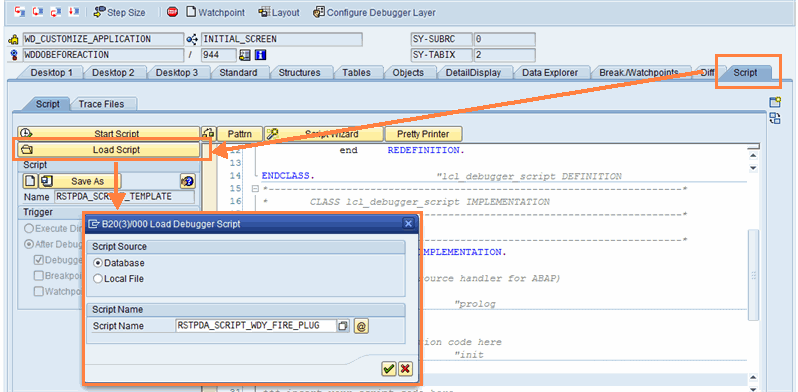 (Example of RSTPDA_SCRIPT_WDY_FIRE_PLUG)
Choose Start Script.
The debugger will stop at a line, as shown in the screenshot below.
Choose Continue Script, so that the debugger stops at the next fire_xxx_plg.
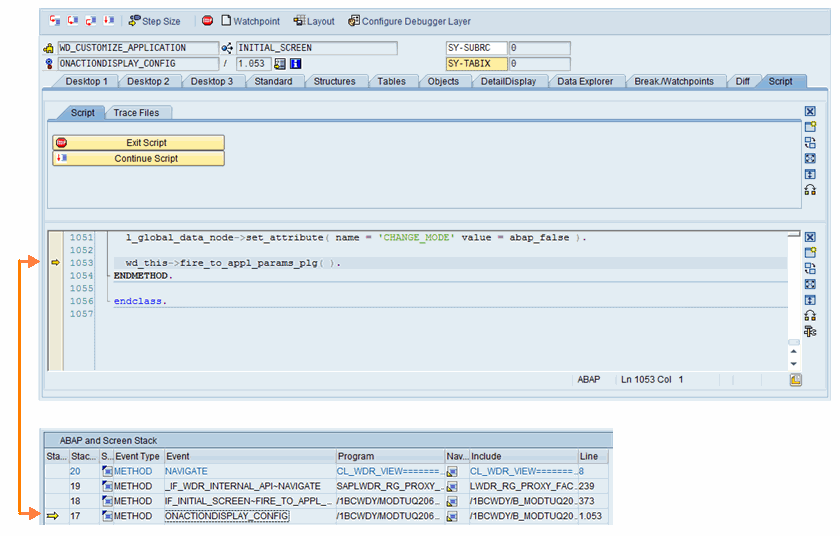 (Continue Script)
 Note
NoteThe debugger has not really stopped on this line above. If you want to look at the ABAP and Dynpro stack in the debugger, you can see that although the displayed coding is contained in the stack, it is not at the highest position in the stack. This is important since the single step (F5) can lead to an unexpected position.
End of the note.
More Information
For more information about debugging scripts, see Debugger Scripting.