
 Configuring General Settings

This section describes the possible general settings on the General tab of the SAPConsole Administrator:
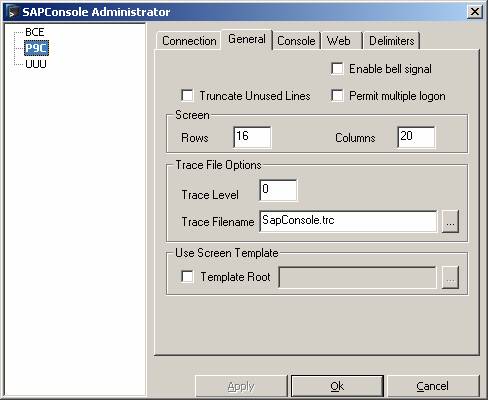
You can configure the following general settings for a profile:
Field/Button |
Description |
Enable bell signal |
Provides a bell sound upon receipt of an error message: ● When using a telnet connection, the bell signal is only possible for SLnet and Georgia Softworks. ● When using a HTTP connection, see Appendix D. |
Truncate Unused Lines |
The ability to define whether unused lines (such as frames and empty lines) require truncation. |
Permit multiple logon |
Enables multiple logons to the same SAP backend system under the same user name. |
Screen rows and columns |
Allows you to configure the size of message screens. |
Trace File Options |
Allows you to create traces. Make sure that the trace file is writable by the server user. If necessary use a full path if you do not know the current start path, for example in case of a webserver service. The trace levels are as follows: 0 Error 1 Warning 2 Trace 3 Monitor |
Use Screen Template |
Enables you to use predefined templates for some SAP screens (currently in test phase).
|