 Automation Queue Services


Automation Queue Services
Use
The following services are available to help you use controls in your applications:
Debugger: For identifying errors
Performance display: Performance optimization
Automation Trace: Finding synchronization points
Features
Debugger
If you use buffered operations on your controls, an error in a method call will not become visible until you synchronize the automation queue. Therefore, when you are debugging a program, it makes sense to synchronize the automation queue after every method call. You can do this by selecting the option Automation Controller: Always process requests synchronously in the Debugger. This calls the generic method
CALL METHOD cl_gui_cfw=>flush after every automation method.
If the error no longer occurs when the method is called directly, you have called the method
CL_GUI_CFW=>FLUSH in the wrong place in your program.
Include error handling after every method call (query the value of
Performance Display
There are two ways in which you can check the number of round trips within your program:
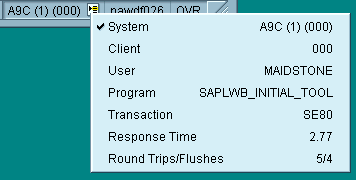

Automation Trace
You can create a trace for the automation queue. To do this, select Automation in the Trace group of the SAPgui settings. Now, all automation queue calls and their parameters (create object, call method, set/get property, free object) are logged in a trace file.
If an error occurs, it is logged in the trace file (
HRESULT error_code ).You can also see how many flushes are required in each PBO/PAI round trip and eliminate those that are redundant.

When you analyze the method calls to the control using the trace, remember that the ABAP methods often do not correspond to the method names in the trace. This is because the method names in the trace are those of the automation calls to the control. Remember, too, that one method call in ABAP may lead to more than one automation method being called.

The method call to load an image into the SAP Picture has the following form in an ABAP program:
CALL METHOD picture->load_picture_from_url
EXPORTING url = 'http://www.sap-ag.de/germany/images/sapag.gif'
In the Automation Trace, the following would appear:


If there are no entries in the automation trace, the error occurred at the backend.