
 Executing a qRFC Example Program

Use
Executing a qRFC example program.
Prerequisites
You have defined a destination in transaction SM59.
Procedure
Use transaction SE38 to run test report RSTRFCT0:
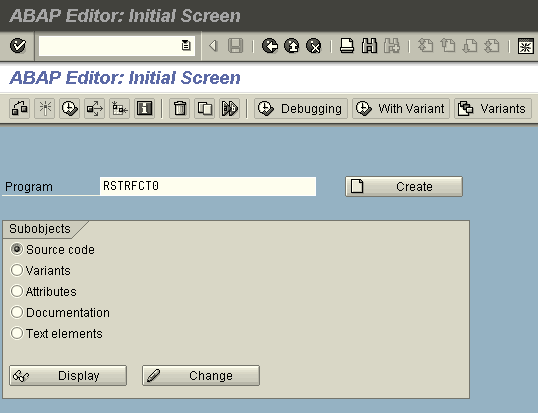
Enter the name of
the test program in the Program field and choose
 (Execute). The following screen appears:
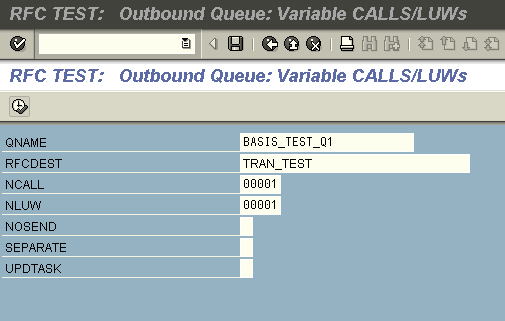
You must enter a
destination and a queue name. You can use predefined queue names and
destinations, or you can define your own. You must have already defined the
destination in transaction SM59 (see SMQS: Registering a
Destination). Start this qRFC by choosing (Execute).
 You can also set the additional flags NOSEND, SEPARATE, and UPDTASK. In this example, however, you do not need to
select these flags.
You can also set the additional flags NOSEND, SEPARATE, and UPDTASK. In this example, however, you do not need to
select these flags.
You must make sure that the specified destination exists. To do this, run transaction SMQS and check whether the specified destination has the status U (not registered). If not, select the destination and press Deregistration. The Type column should then display U. This ensures that this qRFC is not executed immediately by the scheduler, which makes it easier for you to monitor the process.
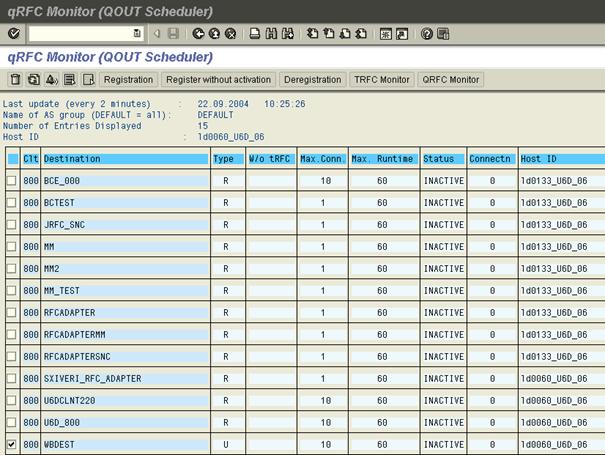
Now press qRFC Monitor. (This has the same effect as running transaction SMQ1). Your destination is displayed:
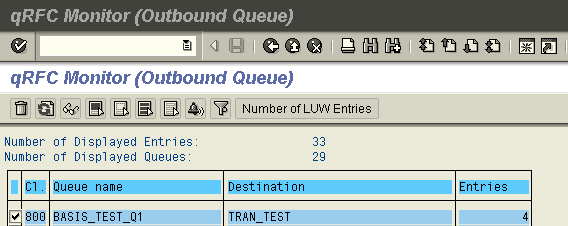
If you have created a new destination, it is
not displayed in the overview list. Press Deregistration and enter the destination you have created. You
can then display your destination by pressing qRFC
Monitor.
To view your qRFC
in more detail, choose  (Display).

You can now trigger
your qRFC call by choosing  (Activate) (or by registering the destination in the
scheduler).
(Activate) (or by registering the destination in the
scheduler).

You can now execute this queue.
Result
You have successfully executed a qRFC with connection type 3. If nothing is displayed under your destination in the qRFC Monitor (transaction SMQ1), the call has been processed successfully.