
 Structure of a BSP Application

A Business
Server Page (BSP) application is an independent development project that is
created and edited in the SAP development environment (transaction SE80).
External design tools, such as Adobe GoLive, Dreamweaver, or Microsoft
FrontPage 2000 can be used to design the BSP application, as well as
 BSP
extensions.
BSP
extensions.

Analog to a classic transaction, a BSP application consists of a user interface and business logic that is assigned to a logical unit, in this case the BSP application.
The user interface of a BSP applications includes:
· Static Web sites
·
Dynamically
generated Web sites, which are BSPs or templates that contain server-side
scripting that is executed dynamically at runtime to generate a static Web
site BSPs can either be pages with flow logic or views.
There can also be controllers if the MVC design pattern
is used
· Various MIME objects, such as pictures, icons, sound files, style sheets, and so on, that are parts of a typical Web application
All of these objects are integrated in the Change and Transport Organizer as parts of the BSP application and are handled as a logical unit. This allows all objects that are part of a BSP application to be fully and consistently transported between all the systems in an SAP system landscape.
The business
logic can be accessed from the BSP application using the typical methods, such
as BAPIs, function modules, or class libraries. In addition, the BSP
programming model provides a structuring tool, the
BSP-Application
class , that can be used to encapsulate the business logic functionality
in the BSP application.
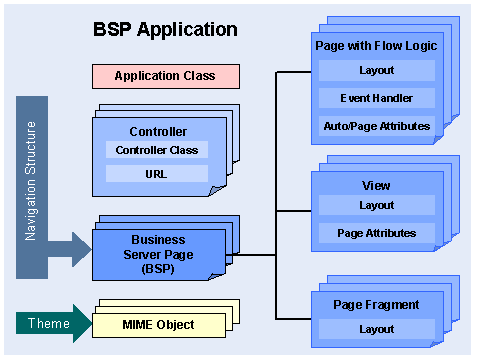
A BSP application consists of the following components:
· Controller
Controllers contain business logic and application data. Controllers assess the data of an incoming request based on a model and then select a suitable view for rendering the response to the user, see also Model View Controller (MVC).
· Business Server Pages (BSPs)
BSPs are the
Web sites that are displayed in the browser when the application is in use.
BSPs can contain static HTML code and dynamic scripting code (ABAP or
JavaScript). The scripting code is interpreted on the server. The exact
structure of a BSP is described in
Building an
BSP.
A page can have the following versions:
¡ Page with flow logic
These are simple pages with event handlers, but without much application logic or visualization elements. It is possible to build a BSP application exclusively out of pages with flow logic and event handlers.
¡ View
Views are used to visualize data, see also Model View Controller (MVC).
¡ Page fragment
These are
created in the same way as normal BSPs, but are then marked as page fragments.
Other BSPs can also include these fragments using the includedirective
(see
Include
Directive).
· Navigation structures
The navigation structure determines which navigation request is used to direct the navigation process from which page to which subsequent page.
· Application class
The business
logic of a BSP application is encapsulated in an application class. This class
is realized by means of a global ABAP class which implements the access to
business data using BAPI calls, for example. Every page of a BSP application
can directly reference the components of this class (attributes, methods, and
so on) using the predefined
Object
application.
You can also assign several BSP applications to an application class.
For more
information, see
Applications Class of
a BSP Application.
· MIME objects
In the SAP system, all MIMEs, such as graphics, style sheets (used to define formatting properties of individual HTML tags), audio files, video files, and so on, are stored and administered in a central repository, the MIME repository.
For every new BSP application, a directory of the same name is created in the MIME repository. This directory is used as a storage location for all application-specific MIMEs.
See also:
Starting and Ending a
BSP Application