
 Edit
Menu for Scanner Peripheral Type
Edit
Menu for Scanner Peripheral Type

Definition
The Edit menu is used to prepare input data for input peripherals such as the scanner. It allows the user to manipulate data groups.
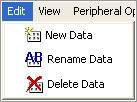
The peripheral data toolbar provides access to the same functions.

Use
Edit menu options for the scanner
Menu option |
Button |
Description |
New Data |
|
Creates and names a new group of data |
Rename Data |
|
Renames an existing data group |
Delete Data |
|
Deletes an existing data group. All barcode data under the group will be lost. |


