
 Associations Between Data Objects

A standard data object can have relationships to other standard data objects. To ensure referential integrity between related data objects in the consolidated data store (CDS), you establish these relationships as associations at node level in the Data Object Builder. Associations are based on back-end key mapping and synchronization key mapping.
More information: Key Mapping Between Associated Data Objects
The association is owned by the referring data object node, it does not appear in the referenced data object.

You can use associations to define a dependency in the distribution model. If a dependency is based on an association you have defined in the data object, the key mapping in the distribution model occurs automatically.
There are three types of association:
· Complete association
All back-end keys of the referenced data object are mapped to the corresponding fields in the referring data object (the data object you are modeling). This is a 1:1 association in which one instance of the referring data object is associated with one instance of the referenced data object.
The CDS and replication and realignment services work based on synchronization keys. Therefore, you need to map the synchronization keys.

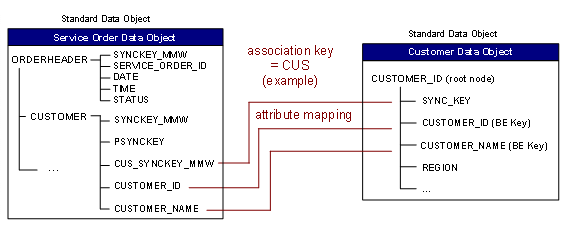
To define multiple associations for the same attributes of a data object, you can use a static filter. (More information about static filters occurs later in this section.) Associations without a static filter result in better performance however, because the static filter adds more WHERE clauses to the queries.
● Partial association
Only a subset of the back-end keys of the referenced data object is mapped. There is a 1:N mapping between the data object instances. This means you can map one instance of the referring data object (the data object you are modeling) to multiple instances of the referenced data object. As a result, the associated synchronization keys have to be maintained in a separate table. For this purpose, a new node is generated containing the associated data objects’ synchronization keys.
Creating an additional node and data has an impact on performance. Therefore, use this type of association only if it cannot be defined using another association scheme.
In this example you have a Material data object and material descriptions in various languages. You want to associate the Material data object with 1:N Material-Text data objects to reflect the different languages. The Material-Text data object has two back-end keys, only one of which is mapped to the text key in the Material data object.

● Extract association
Extract association helps in supporting the multi language scenario. The association creates a mapping between a language-dependant field and its descriptions in various languages. Depending on the language configured on the client, the language-dependant fields are replaced with the appropriate language descriptions. A client is configured with a particular language and it receives data only in that language.
Consider the previous example, where you have a Material data object and material descriptions in various languages. When a client device is configured with the English language, on synchronization with the DOE, it receives material descriptions in English.
Creating an Association
To create an association, you must provide the following data:
● Association name (mandatory): A unique, three-character name identifying the association within the data object (association key).
● Description (optional): A short description of the association.
● Name of the associated data object (mandatory). This data object must be active.
● Association type (mandatory): A complete or partial or extract type.
● Associated node attributes: The back-end keys and the synchronization key of the root node of the referred data object are entered automatically. You have to define the attributes of the referring node that are to be associated with these back-end keys. If no synchronization attribute for the association exists in the referring node, you can have this generated by the system (CUS_SYNCKEY_MMW data object in the top figure).
● For a static filter:
To define associations between one referring data object and more than one referred data object using the same attribute in the referring data object, you must define a static filter. This consists of a link field with a static value that distinguishes which association a data object instance refers to.
¡ Link field: The link field can be one of the attributes from the referring node except for the synchronization and the back-end keys and the attributes used for key field mapping.
○ Link value: This is the value given for the link field which is used to identify which association is valid for the instance of a data object.
In this example, the REFKEY field can have the value of an order ID or an activity ID. The value in the SOURCE field (link field) specifies whether the current instance refers to an order (ORD) or an activity (ACT). If the value in the SOURCE field is ORD (as specified in the Link Value field), then the instance refers to an Order data object (REFKEY = order ID). Similarly, if the value is ACT, then this instance refers to an Activity data object (REFKEY = activity ID).

Whenever you create an association, the system performs a check to ensure that the key field mapping is complete in all respects. That is, all the back-end keys and the synchronization key of the root node have been mapped to the corresponding attributes of the leading node against which the association is created).