Developing Mobile
Applications
Developing Mobile
Applications

This guide provides you information on how to develop mobile applications for laptops and handhelds using the Data Orchestration Workbench and the SAP NetWeaver Developer Studio.
SAP NetWeaver Mobile provides an end-to-end mobile application development. The end-to-end application development can be classified as development in the Data Orchestration Engine (DOE) and the front-end development.
The Data Orchestration Engine (DOE) comprises two tools: the Data Orchestration Engine Workbench for defining data objects and mapping the data flow and distribution between the mobile device and the back end and the SAP Mobile Administrator for monitoring the data flow at runtime through system messaging.
SAP NetWeaver Mobile provides the following plug-ins that allow you to develop mobile applications:
· Mobile Applications for Laptop plug-in
· Mobile Applications for Handheld plug-in
The SAP NetWeaver Developer Studio provides the Integrated Development Environment (IDE) for these plug-ins.
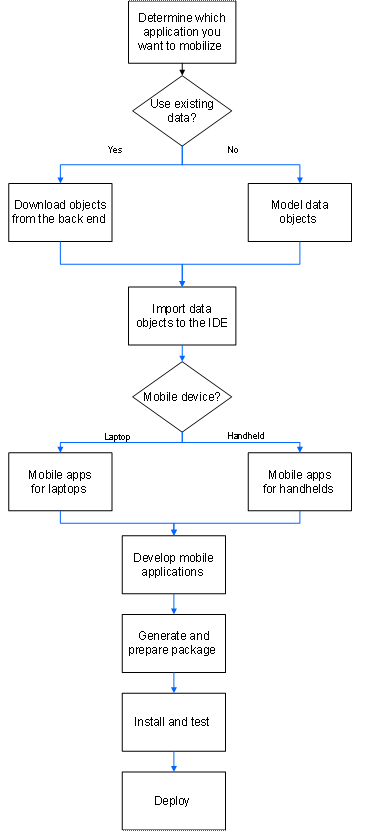
Development Process Flow
...
1. Identify the business objects for the application you want to develop for use on mobile devices.
2. Download the business objects to the NetWeaver Application Server.
More
information:
 SAP NetWeaver Mobile
Administrator
SAP NetWeaver Mobile
Administrator
3. Define the data objects for use with mobile applications.
More information: Defining Data Objects and Distribution for Mobile Applications
4. Develop an application for the mobile device:
¡ Develop applications for laptops.
More information: Developing Mobile Applications for Laptop
¡ Develop applications for handhelds.
More information: Developing Mobile Applications for Handheld
Example: Implementation Flow