
 Automatic Key Mapping

By setting the Switch on Automatic Key Mapping indicator for the data object, the system maps the back-end key fields to the corresponding child nodes of a data object. Automatic key mapping can be achieved only if:
· The back-end key fields of the nodes higher in the node hierarchy of a data object are contained as back-end fields in the child nodes.
· The back-end key fields have the same names and data types.

If automatic key mapping is switched on, the system maps the back-end key fields to the corresponding child nodes’ fields when you activate the data object.
If the system does not find any matching fields, it creates appropriate fields and performs the mapping implicitly.
Example
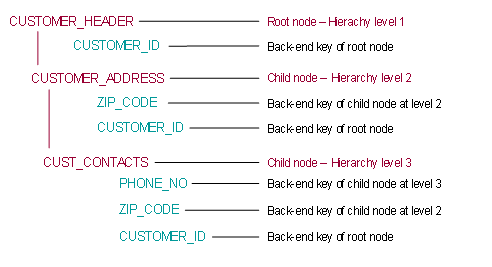
This example shows the ideal case, as each node of the data object contains fields holding the back-end keys of the nodes further up in the node hierarchy plus its own back-end key(s). In such cases, you can set the Switch On Automatic Key Mapping indicator for the data object. The Data Orchestration Engine (DOE) automatically maintains a mapping between these nodes’ fields and the back-end key fields of the nodes further up in the node hierarchy of the data object.
Do not switch on automatic key mapping if a back-end key field of a parent node and a field in the child node have the same name and data type but do not correspond. This results in incorrect field mapping.
Example: The CUSTOMER_ID field in the CUSTOMER_ADDRESS child node in the example below does not contain the back-end key of the root node but contains other child node information. There is a different field in the child node, which corresponds to the back-end key field of the root node (CUST_ID). In this case, enabling automatic key mapping results in incorrect mapping. In such a case, you must use explicit key mapping.
