
 Effective Testing with ABAP Unit

Complete Test Coverage
At first glance, the test in the previous case appears to be so simple that it would have been quite easy to establish why the program is not functioning correctly without the aid of a unit test. In actual fact, ABAP Unit is also the means for discovering errors in such simple cases.
The strengths of ABAP Unit are demonstrated even better when used in conjunction with large programs. Imagine a report SAMPLE_REP which calls 10 methods A-K of the local class LCL_X sequentially. A change request from a customer requires a different return value for the method LCL_X->A and, after adjusting the called service method LCL_SERV->SERVICE_M, the method LCL_P->A returns a result that satisfies the customer’s wishes. Now let us assume that changing the service method LCL_SERV->SERVICE_M has a side effect resulting in the method LCL_X->K running incorrectly: Method LCL_X->K now accesses the changed service method, but requires it in its original, unedited form, which no longer exists of course.
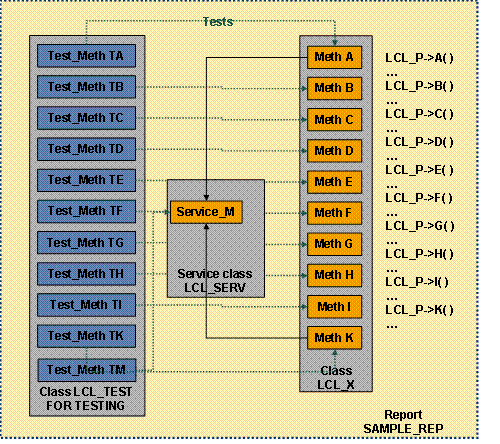
If you have covered all the methods of your program with ABAP Unit tests, you will discover this side effect at the touch of a button – that is, as soon as you run the unit tests for your TU, in this case the report SAMPLE_REP. This also underlines one of the central ideas of unit tests, the complete test coverage of TUs.
Providing Good Test Data – Methods SETUP and TEARDOWN
A further important condition for the effective testing of complex programs is good test data. You should be systematic and continue to work with the same initial test data. This means, you should also be able to set up test data in your unit test. To avoid your tests affecting one another, different tests that all work with the same data should always be able to access this data in unaltered form. This is one aspect of the fact that unit tests should run isolated from each other.
The setup of test data and test objects is supported by ABAP Unit in the form of fixture methods. There is a SETUP method in a test class, into which you can relocate the data setup that is required before each test. If you require a specific internal table in its initial state for each test, you do not have to recreate it in every test method. You can relocate this into the SETUP method. There is also a corresponding TEARDOWN method for the SETUP method, with which you can release the resources again. To avoid the individual tests influencing one another (isolation requirement), the SETUP method is executed before and the TEARDOWN method after the execution of each test method.
Repeatedly setting up specific test resources can be very performance-intensive, and it is also unnecessary if this data is not changed by the test methods but only read. For this purpose, there is a CLASS_SETUP and a CLASS_TEARDOWN method.

You have now encountered two fundamental ideas of unit tests: It is important to achieve complete test coverage and it is worth investing some effort in the quality of the test data. We have now reached a point where you can start to learn a little more about the general philosophy of unit tests.