
 Exclusive Database Access - Lock Concept of
the SAP NW AS
Exclusive Database Access - Lock Concept of
the SAP NW AS

For some database accesses, you must ensure that your program has exclusive access to this data for a specific time period. This is the only way to avoid another user working with the data while you are changing it. For example, it must be impossible for the situation to arise where two users both sell the last flight. The solution to this problem is a lock concept. Just as the SAP NW Application Server has its own transaction concept, it also has its own lock concept. The granularity of the database locks is not very fine and they are also not flexible enough. Locks should also remain in place for the duration of database transactions and SAP transactions. The SAP locks work with logical lock objects. Lock objects allow you to set SAP locks for entire application objects. An application object consists of one or more data records in a database table, or several data records from multiple database tables that are linked using foreign key relationships.
Before you can use a lock object, you must create it in the ABAP Workbench. A lock object definition contains the database tables and their key fields on the basis of which you want to set a lock. When you create a lock object, the system automatically generates two function modules with the names ENQUEUE_Name and DEQUEUE_Name. You can then set and release SAP locks in your ABAP program by calling these function modules in a CALL FUNCTION statement.
These function modules are executed in a special enqueue process, which exists only once system-wide. The enqueue function module sets an SAP lock by writing entries in the central lock table. If the lock cannot be set because the application object (or a part of it) is already locked, the function module informs the user. The following figure shows the components involved in the lock process:
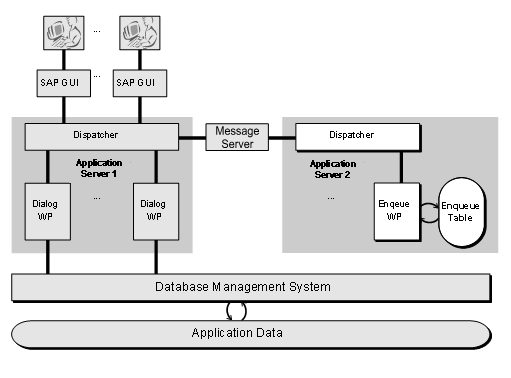
SAP locks are logical locks:
· The effectiveness of the locks depends on cooperative application programming: Since no physical locks are set in the database tables themselves, all programs that use the same application objects must query the central table for any locks explicitly. There is no mechanism that automatically prevents a program from ignoring the locks in the lock table. An SAP lock is thus like a traffic light, not like a barrier.
· A locked data record is not physically locked in the database table.
· A locked data record does not have to physically exist in a database table.