
 Emulator Launch Configurations
Manager
Emulator Launch Configurations
Manager

Use
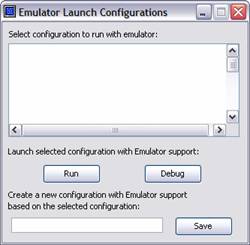
The Emulator Launch Configurations Manager window allows the developer to select an Eclipse launch configuration, associate it to an application created by the developer, and modify it in order to add support for the Peripheral I/O Emulator.
Prerequisites
The Peripheral Support Emulator Actions Toolbar must have been added to the current Eclipse perspective. An Eclipse launch configuration associated with an application that requires peripheral support must have been created and executed.
Features
The Emulator Launch Configurations Manager allows the developer to modify an Eclipse launch configuration in order to add support to run the application to which it is related with the Peripheral I/O Emulator. There are two ways provided to do this:
1. Launch a selected configuration with additional Emulator support added on either normal or debug mode.

To run a launch configuration, select it from the list and click on the Run button. To run the configuration on debug mode, click the Debug button after selecting the launch configuration.
2. Create a new Eclipse launch configuration with Emulator support based on an existing launch configuration.