
 Open the Emulator Launch Configurations
Manager
Open the Emulator Launch Configurations
Manager

Use
This option allows the developer to open the Emulator Launch Configurations Manager window, from which it is possible to launch an application with support for the Peripheral I/O Emulator.
Prerequisites
The Peripheral Support Emulator Actions Toolbar must have been previously added to the current Eclipse perspective.
Procedure
-
Click on the Open the Emulator Launch Configurations Manager
 button.
The Emulator Launch Configurations Manager window is shown.
button.
The Emulator Launch Configurations Manager window is shown.
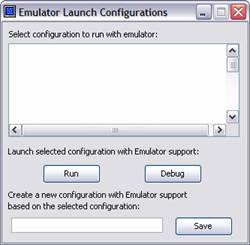

You can also open the Emulator Launch Configurations Manager window by selecting Open the Emulator Launch Configurations Manager from the Edit menu.
Result
You can access the Emulator Launch Configurations Manager window functions to launch your application with support for the Peripheral I/O Emulator.