
 Using Third Party Development
Infrastructure
Using Third Party Development
Infrastructure

With the SAP NetWeaver platform, you can perform the following types of development:
Development based on the SAP component model, without NWDI support
You develop applications in development components (DCs) on the SAP NetWeaver platform using different SAP and non-SAP technologies (Web Dynpro, Guided Procedures, Composite Applications or standard JSP, EJB applications), based on the SAP Component Model. At the same time, you are free to choose the development infrastructure tools and processes that best suit your needs, no matter if these are SAP products or not.
The following documentation describes the recommended way to organize the development processes that you should follow to be able to integrate these external tools into your development process, or if you plan later on to integrate and work with the full NWDI support. At the same time, the two perspectives that are provided with the SAP NetWeaver Developer Studio for working with NWDI (the Design Time Repository and the Development Infrastructure perspectives) can be also used in your system and in this way ease your work process.
Why is all this important?
This development scenario is applicable if you have already bought or prefer to work with a certain third party development infrastructure tool. For example, you can have a versioning system that you want to use instead of sticking to the one proposed by SAP DTR server, or if your development is based on the local file system and you do not want to use versioning system at all. Organizing your development in the process that is described in the following topics allows you to benefit from the best practices we have for efficiently organizing the development components. If you follow these recommendations, you should be able to plug your development into other SAP systems (the full-blown NWDI) later on without much effort or many problems.
The Developer Studio (in SAP NetWeaver CE) provides a command line tool, which provides some of the functionality of a full-blown NWDI system, but without needing to install anything more than the Composition Environment.
This development scenario provides the following benefits:
● Faster development start. The development can start immediately without having to set up an infrastructure first.
● Small development teams may actually not need the complete Software Change Management environment as it is provided with NWDI.
The constraints are:
● Since today there is no commonly accepted standard for development life cycle management systems, it is not possible to leverage the same level of integration and convenience to developers as with NWDI. Compared with the NWDI landscape, this development scenario has certain limitations. For example, it is impossible to anticipate the concrete set of development life cycle tools and processes at customer site, and to provide a tight integration with all of them (and in all possible combinations).
● You have to integrate the SAP NetWeaver technology with your own development tools and processes.
In this section, you will find a description of the specifics of this type of development, plus recommendations how to organise the entire development infrastructure to ease your development processes. In addition this might be helpful if you later on decide to switch to integration with the full SAP NetWeaver Development Infrastructre.
Configuration Steps
The configuration comprises in setting up the development and production landscape. For the development itself the Developer Studio is used, which means that certain configurations to the perspectives and the underlying infrastructure must be performed.
Development Steps
The development starts with normal development projects wrapped in DCs. Then you build the DCs, and if the build is successful you group them into DC archives. The DC archives are packed in the software component (SC) and out of the SCs you have, you generate an SCA file that you can distribute to your customers:
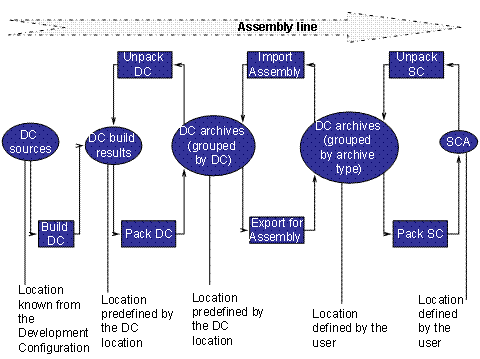
Production Life-Cycle

For the development itself, you use the SAP NetWeaver Developer Studio. Since the Developer Studio is based on the Eclipse open-source development platform, you can add additional plug-ins and in this way integrate third party technologies. You choose the processes and the tools you use to cope with sharing of source and libraries within a development team, change management and versioning, central build, transport, testing, deployment and so on.
More information
In the following sections, you will find more information that is relevant to the use of the external development infrastructure. Since we cannot assume exactly what you will decide to use as the development infrastructure, we are offering as much information and as many recommendations here as we can about how to set up your system. This information is only an overview of what SAP provides and it is up to you to manage the integration of the external development infrastructure successfully and without errors.
More information about:
●
 Composition
Environment Command Line Tool – description of the command line tool
and its commands.
Composition
Environment Command Line Tool – description of the command line tool
and its commands.
●
Component Model
– description of the SAP’s component model.
Standard development of a Java EE application on the SAP NetWeaver platform
Since this means that you develop only standard applications (EJB, Servlet, JSP, JSF and so on), no proprietary SAP APIs or libraries are used, nor do you apply the SAP component model. The developed applications can be assembled and deployed directly to the AS Java, while the administration is performed using the SAP NetWeaver Administrator. From the SAP NetWeaver Development Infrastructure (NWDI), you use only the Design Time Repository (DTR) as a file storage and versioning system.
More information:
Java
Development with a Central Storage for the Source Files.
Development based on the SAP component model with the full SAP NetWeaver Development Infrastructure (NWDI) support
You perform the development in development components (DCs). In this development scenario you also use the full functionality that NWDI provides. The DTR serves as central file storage, the Component Build Service (CBS) for the central build, the Change Management System (CMS) for managing the software and the SAP NetWeaver Developer Studio as the development tool.
More information:
Components
Development with the NWDI.