
 ABAP Unit Tests

Structure of Unit Tests
An ABAP Unit test unit (TU) can be a class, function pool, executable program, or module pool. You can call ABAP Unit for testing individual TUs from the Class Builder (SE24), Function Builder (SE37), ABAP Editor (SE38), and SE80. Mass tests can be carried out from the Code Inspector.
You organize your tests into classes and then into test methods, which are all part of the TU. The system checks small units within the TU, hence the name ABAP Unit. The aim of a test method is to check whether a unit returns the desired result. For this purpose, there are methods of the service class CL_AUNIT_ASSERT that execute comparisons between target and actual values calculated by a unit. The results of all unit tests of a TU are then shown in the ABAP Unit result display.
Example
Let us look at an example to help clarify this. Our minimalist TU is a percentage calculator that delegates this task to a subroutine:
REPORT Percentages.
PARAMETERS: price TYPE p.
PERFORM minus_ten_percent CHANGING price.
WRITE price.
FORM minus_ten_percent CHANGING fprice TYPE p.
price = fprice * '0.9'.
ENDFORM. "Minus_ten_percent
We add a test class to the report, which tests whether the subroutine correctly calculates the percentage for a specific value.
CLASS test DEFINITION FOR
TESTING. "#AU Risk_Level Harmless
"#AU Duration Short
PRIVATE SECTION.
METHODS test_minus_ten_percent FOR TESTING.
ENDCLASS.
CLASS test IMPLEMENTATION.
METHOD test_minus_ten_percent.
DATA: testprice type p value 200.
PERFORM minus_ten_percent CHANGING testprice.
cl_aunit_assert=>assert_equals( act = testprice exp = 180
msg = 'ninety percent not calculated correctly').
ENDMETHOD.
ENDCLASS.
The test class and the test method TEST_MINUS_TEN_PERCENT are recognized by the tool through the addition FOR TESTING. The additions "#AU RISK_LEVEL HARMLESS and "#AU DURATION SHORT are not optional comments but annotations containing required technical information. With RISK_LEVEL you specify to what extent, if at all, executing the test endangers critical data. The time is specified so that any tests in endless loops are automatically cancelled due to a timeout.
In the transaction SAUNIT_CLIENT_SETUP, you can make settings for an entire system with regard to the RISKLEVEL of tests and the times assigned to the individual attributes that specify the permitted duration (DURATION: SHORT, MEDIUM, and LONG). For example, in some development systems you will want to prohibit tests that change important data. If the test is cancelled for any reason, it is possible that some data may be left with invalid values or in an inconsistent state. Therefore, you will set the permitted RISKLEVEL suitably low in such systems.
Service of the Class CL_AUNIT_ASSERT
As parameters, the service method CL_AUNIT_ASSERT=>ASSERT_EQUALS requires a target value and an actual value, which is the result of the tested calculation; it then compares the two values. The MESSAGE parameter should contain a text that explains what went wrong during the test. You can also pass a parameter with the service method CL_AUNIT_ASSERT=>ASSERT_EQUALS that specifies the severity of the error, as well as a parameter stating how to proceed if the test fails: Should the test method simply continue, or should the current test method, the entire test class, or all tests of the TU be canceled?
In addition to this method, the class CL_AUNIT_ASSERT also provides other methods, which execute different checks and pass the results to the framework. Most importantly, you should note that you can use the parameters of the methods of the service class CL_AUNIT_ASSERT to control the flow of the whole unit test and include information in the test methods that will later provide you with important details about any errors in the result display.
ABAP Unit Result Display
On the left side of the result display, all the tests of your TU are grouped into a task. In our case, this is only one test class with a single method:
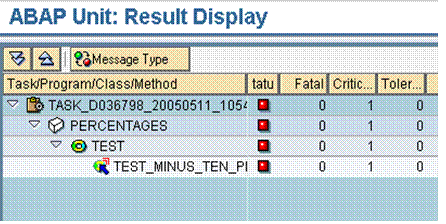
Via the name of the method, you can see what parts of the test method caused errors during the test:
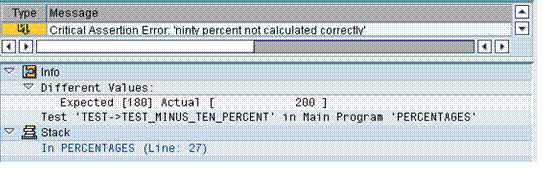
The message you passed with the service method is displayed at the top. Below that, you can which values diverge and can navigate to the class via the stack line.
In our example, a closer examination of the code reveals that the input parameter of the report was confused with the change parameter of the subroutine.