 Authorization Checking for File Search
Authorization checking for File Search is used to make sure that users only see the files in the SAP NetWeaver Enterprise Search results list that they are authorized to access. For this reason, SAP NetWeaver Enterprise Search uses the file access rights when users search through files on a file share. In addition, the user's authorization data is extracted by an LDAP server and compared at runtime.
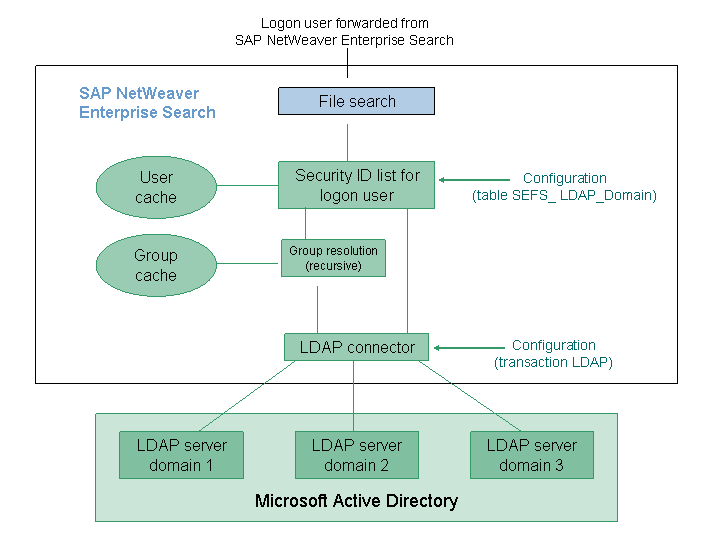
Overview of the Concept for Authorization Checking
The SAP NetWeaver Enterprise Search concept of file search authorization checking supports the security concept of Microsoft file shares in the TREX search engine for SAP NetWeaver Enterprise Search at runtime. Authorization information is available for both users and files:
User
Users can be members of one or more authorization groups, which in turn can belong to other authorization groups.
Users and authorization groups are represented in the central directory by unique security IDs. The security ID lists of users and authorization groups are extracted from the central directory via LDAP (Lightweight Directory Access Protocol).
Group cache
Users are usually assigned to multiple groups and group-in-group memberships must be resolved. During the extraction of authorization data, authorization groups are resolved recursively and groups that are not relevant for security are filtered out. The group cache contains a complete security ID list for each starting point of a group resolution.
User cache
The user cache contains a complete security ID list for each logon user and domain. The user and group authorization information is kept separate, therefore the user cache can be rebuilt much faster.
 Note
NoteThe user and group caches are maintenance-free, requested cache entries are updated on-the-fly as soon as their timestamp is older than 24 hours.
If you nevertheless want to update the entire cache tables, you can use the reports RSEFS_LDAP_USER_UPDATE and RSEFS_LDAP_USERGROUP_UPDATE.
More information: Managing the User Cache and Group Cache for the File Search
End of the note.Files
The individual files in a Windows file share can be directly or indirectly assigned to user or group security IDs. Indirect assignments are made through the file share hierarchies in which the files are located. When crawling the file share, TREX extracts the effective security ID list as a technical attribute of each file and includes it in the file index.
At runtime, the security IDs of the logon user are checked against the security IDs of the objects found in the back-end system. The search results list contains only items that the user is allowed to see.
Note
The cache content is stored in a database table so that it can be retrieved quickly after an application server is restarted.
Prerequisites
File share access is handled with Microsoft Active Directory.
SAP user names are known to the connected directory.
The user is logged on to a Windows domain before logging on to SAP NetWeaver Enterprise Search.