 Security of the Communications Channels
Communication Connections
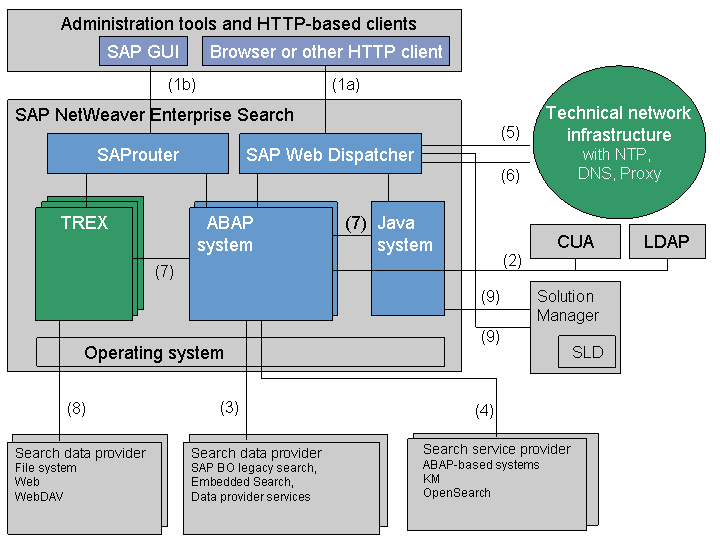
The following figure shows the communication paths between the individual SAP NetWeaver Enterprise Search components and systems connected to SAP NetWeaver Enterprise Search:
Number in Figure |
Connection |
Protocol |
Comment |
|---|---|---|---|
1a |
Browser and other HTTP-based clients to SAP NetWeaver Enterprise Search (search) |
HTTP/HTTPS |
Search request/response data
For more information about activating HTTPS, see Configuring SAP Web Dispatcher to Support SSL. End of the note. |
1b |
Administration tools to SAP NetWeaver Enterprise Search (administration) |
SAP GUI |
Administration requests |
2 |
SAP NetWeaver Enterprise Search user replication |
RFC/LDAP |
User profiles (names and groups) You must create connections to a directory service, such as a CUA or MS ADS (LDAP), for user authentication. SAP NetWeaver Enterprise Search assumes that this server is accessible directly from the private netwwork via appropriate routing. |
3 |
SAP NetWeaver Enterprise Search to search data providers (SAP BO legacy search, Embedded Search, data provider services) |
SAP BO legacy search: RFC (bi-directional) Embedded Search: RFC (bi-directional) Data provider services: SOAP (HTTP/HTTPS) |
Search request/response data, metadata, user data |
4 |
SAP NetWeaver Enterprise Search to search service providers and vice versa (ABAP-based systems, KM, OpenSearch) |
ABAP-based systems: RFC KM: SOAP Web service, HTTP OpenSearch: REST Web services, HTTP |
Index data, user data |
5 |
SAP NetWeaver Enterprise Search to customer LAN |
NTP, DNS, OSS |
Domain resolution, time synchronization, access to SAP Service Marketplace |
6 |
Customer LAN to SAP NetWeaver Enterprise Search |
SSH, X11 |
System administration |
7 |
SAP NetWeaver Enterprise Search internal |
RFC (connection name: FASTSEARCH) |
Search request/response data, user data. Server-to-server communication is mostly based on RFC calls. |
8 |
SAP NetWeaver Enterprise Search to search data providers (file system, Web, WebDAV: Indexing files) |
File system: Netbios Web: Netbios WebDAV: HTTP |
File system crawler |
9 |
SAP Solution Manager to SAP Web Dispatcher and Application Server Java |
HTTP Web service |
 Note
NoteYou can use Secure Network Communications (SNC) to protect RFC connections and Secure Sockets Layer protocol (SSL) to protect HTTP connections.
For additional security, access to SAP Web Dispatcher, SAProuter, the SAP message server, and SAP Gateway is restricted using appropriate access control lists (ACLs). In addition, the files hosts.deny and hosts.allow can also be used on the individual servers.
For more information, see the SAP NetWeaver Security Guide, Transport Layer Security section.
All communication between the public customer network and the SAP NetWeaver Enterprise Search private network should only happen through the SAP Web Dispatcher und SAProuter components dedicated to this task.
No data requiring special protection (for example, passwords) is transferred during indexing. Data that is of interest to third parties (for example, the company's financial data or personal account numbers) is only transferred if the customer selects it as a source for indexing.