
 Restoring After Executables
Disk Crash
Restoring After Executables
Disk Crash

Prerequisites
The procedure described here assumes that your system is installed on three disks: one disk for the SAP database, one for the transaction logs and one for all remaining files including the operating system and SQL Server executables. If the disk with the executables crashes, you cannot use your SAP system, your SQL Server or your operating system.
Before you can begin to rectify the situation, you need a functioning operating system. In a first step you must therefore install and boot an auxiliary Windows operating system. You can then start the restore procedure from this system.
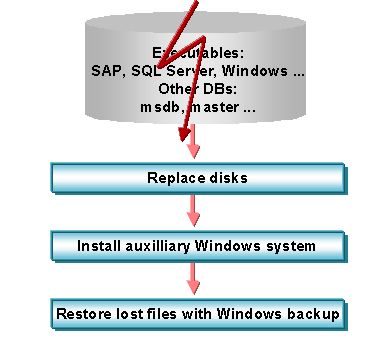
The following figure gives an overview of the restore steps:
Overview of the Restore Steps
Procedure
...
1. Replace the damaged disks.
2. Install an auxiliary Windows system.
3. Restore the files that were lost on the crashed disk using the most recent full Windows backup. Refer to the Windows online documentation to find out how to restore a Windows backup.

In this disk crash scenario, the SAP database and transaction logs are unaffected. Do not reload these from the Windows Backup.
4. Reboot your server with the restored, primary Windows system.
The executables disk has now been restored to the state it had at the time of the last full Windows backup.

The msdb databases may not be up to date. It is therefore recommended that you now restore the most recent backup of this database. For more information, see Restoring a Database Backup.