 Architecture of Visual Composer in the Developer Studio
The following diagram illustrates the high-level architecture of Visual Composer in the Developer Studio:
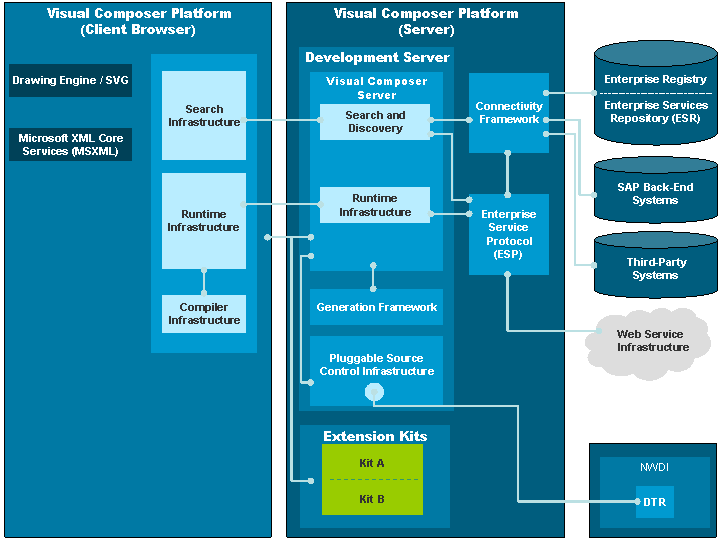
The Development Server provides a platform for design time infrastructure integration. The following modules are installed on the Development Server:
Visual Composer Server: Contains infrastructure components, together with the client core (Storyboard) and extension kits.
Generation Framework: Provides the infrastructure required for deployment to the supported environments.
Pluggable Source Control Infrastructure: Enables Visual Composer to work with different source control systems. The SAP Design Time Repository (DTR) is part of the NetWeaver Development Infrastructure (NWDI). The DTR stores and handles modeled components and provides version control
The following modules are available with Visual Composer:
Connectivity Framework: Provides connectivity to SAP back-end systems, Enterprise Registry, and SAP Enterprise services for use during design time. The connectivity framework also connects to the Web service infrastructure using the Enterprise Service Protocol, to provide connectivity to Web services.
Enterprise Service Protocol: Encapsulates all Web service interaction to be used with Visual Composer, including discovery and execution.
Data Service Systems are connected to the AS Java using the connectivity framework and can be used when modeling with Visual Composer. These systems include Web service infrastructure, Enterprise Services Repository, SAP back-end systems, and third-party systems.
The Visual Composer Platform includes the following fully-integrated modules used for designing models with Visual Composer:
Installed prerequisites, such as Adobe SVG Viewer and Microsoft XML Parser (MSXML).
Visual Composer Storyboard functionality and the various infrastructures required for freestyle modeling.
In the browser-based Visual Composer, at design time the Storyboard is accessed from the client machine through Microsoft Internet Explorer version 6.0 and higher.
In Visual Composer in SAP NetWeaver Developer Studio, at design time the Storyboard is accessed as an Eclipse editor which hosts Microsoft Internet Explorer version 6.0 and higher.
Extension kits, which are packaged groupings of resources that provide a specific set of features, extend the functionality of Visual Composer Storyboard.
In the browser-based Visual Composer, the extension kits are deployed to the Java EE Server database, and are loaded to the Visual Composer client using the Visual Composer Server. You access Visual Composer in your Web browser.
In Visual Composer in SAP NetWeaver Developer Studio, the extension kits are installed in the SAP NetWeaver Developer Studio as Eclipse plug-ins, and are loaded to the Visual Composer Storyboard using the Visual Composer Server. You access Visual Composer in your editor.