 High-Level Architecture and Workflow
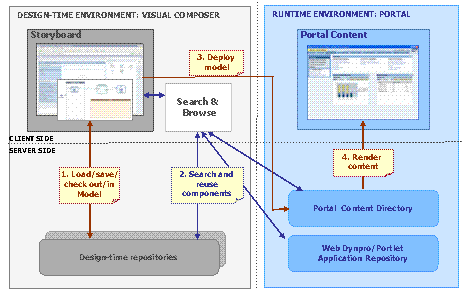
The following figure depicts the high-level architecture and the portal content modeling workflow in the SAP NetWeaver Composition Environment.
Workflow
In a typical workflow, you perform the following tasks:
WYSIWYG portal content modeling
You visually model portal content objects in the Portal Layout board of Visual Composer by dragging and dropping appropriate icons and configuring their properties.
More information: Modeling Portal Content
Maintaining modeled content
You maintain the modeled content in the design-time repositories available in your landscape, along with the other Visual Composer models and components.
More information: Lifecycle Management
Searching and reusing existing objects and components
You search for existing modeled portal content objects or Visual Composer models or components stored in the design-time repositories, as well as regular portal objects stored in the portal runtime repositories (PCD, Web Dynpro and portlet applications repository), and reuse them by integrating in your model.
More information: Reusing Existing Components
Compiling, packaging and deploying modeled content from within the design-time environment
After the application model is finished, you compile and deploy it to the PCD. To modify already deployed portal content, you modify the model, and then redeploy it.
More information: Deploying Modeled Portal Content
Previewing modeled content in a runtime environment
You can preview and test the deployed models in the local development portal.
More information: Previewing Modeled Content in the Portal
Workflow Modes
You can model portal content in two workflow modes:
Bottom-up mode
You create the basic content objects, such as iViews, pages, worksets, then create a containing object, such as a page, a workset, a role or a work center, and collect the newly created or existing basic objects in this container.
Top-down mode
You start from a containing object and add the basic objects to it on the fly, creating new or reusing existing objects as required.
Your choice of the workflow depends on your individual style, habits and current needs. The bottom-up mode is more convenient when you are building content from scratch, whereas the top-down mode is useful when you are assembling existing content objects into an application.
Note that in the Portal Content Studio you can only work in the bottom-up mode.