 Working with the Build Environment
The Component Build Service (CBS) is part of the Development Infrastructure (NWDI). Here you can find information about how to complete the development processes and build the sources with CBS.
An important function of the central build process is to align the work of large development teams. Unlike in the local build, the central build builds the sources in the context of the entire application (as far as it exists at that moment). This allows you to judge at a very early stage whether the individual parts integrate well.
The environment for developing a software component (SC) is determined by the import of a development configuration. The development configuration determines the contents of Design Time Repository (DTR) and CBS. For more information, see CBS Buildspace.
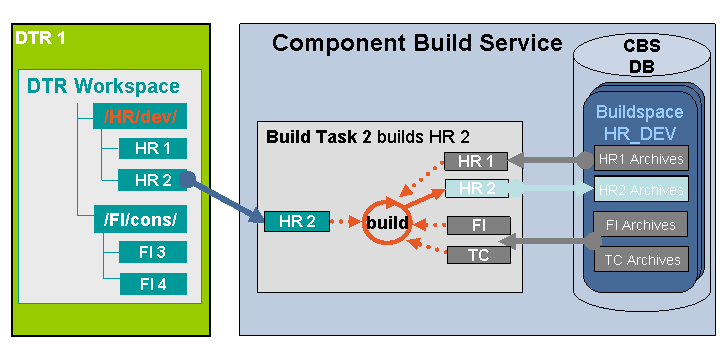
Build process in the CBS
We build the component HR2. The software component (SC) HR is based on the SCs FI and TC.
The build process in the CBS is a build on demand of all the new and dependent components (incremental build), in contrast to the regular build of all components. By knowing the dependencies between components, which are described according to the SAP component model when you create the components, the CBS must execute the build process only for changed and dependent components.
The build process covers the following steps:
A developer starts the build from within the SAP NetWeaver Developer Studio.
The CBS starts a build task.
The build script is provided for a large number of component types.
The CBS automatically receives the required resources and archives.
The latest resources (HR2) from the DTR.
The required archives from the CBS buildspace (HR1, FI and TC).
The build process starts in the build tool.
The newly built archives (HR2) are stored in the buildspace (HR_DEV).
Synchronizing Build Tasks
Serializing build tasks would slow down the build process considerably. Therefore, the CBS is able to process several build tasks in parallel. However, this could lead to using obsolete archives, because they may be changed in parallel to the build of a dependent component. (If this happens at a later time, the inconsistent state is automatically corrected by rebuilding the dependent component.) This prevents the CBS from recognizing archives that become obsolete during the build process. In such case, the build process runs again, retrieves the new version of the archive, and stores the version built on the correct archives in the buildspace.
Deployment
The deployment after a successful build process happens automatically. One target is the central test system. More information: Working with the Change Management Service.
Process Flow
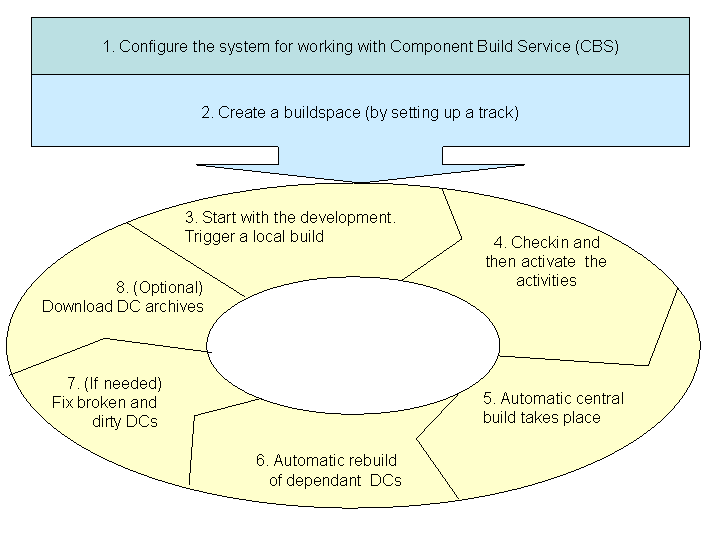
The figure below describes the steps you have to perform a build in the CBS:
Process Flow
Procedure
1. Configure the system
Prior to working with the CBS, you must set up the build environment.
For more information, see Configuring the System for the CBS.
You can trigger a build using different JDK versions for the build tool and the JDK you use for development.
For more information, see Building Using Different JDK Versions.
For more information about the build plugin framework, see SAP Note 1061467.
For more information about the CBS build options, see Build Options.
2. Create a buildspace
The buildspace is automatically created when you create a new track in the landscape.
For more information, see Managing Buildspaces.
3. Development and local build
You start with the development and when needed you trigger a local build. Note that the local build is not connected in any manner with the CBS server.
For more information about triggering a local build, see Triggering a DC Build.
4. Checkin and activate
You checkin your changes, and then activate the activities.
For more information about activating the activities in the Developer Studio, see Activating Activities.
5. Automatic central build
Once your changes are activated an automatic central build on the CBS server takes place.
For more information about manually triggering the central build, see Triggering a DC Build.
6. Rebuild of the dependant DCs
CBS performs an automatic rebuild of the dependant DCs.
For more information, see Rebuild of Dependent Development Components.
7. (Optional) Fix the broken and dirty DCs that might appear after the build
For more information, see Broken and Dirty Development Components and Fixing Broken Development Components.
8. (Optional) Download the different build archives depending on the build type
For more information about manually downloading the build archives, see Downloading DC Archives.