 Technical System Landscape
The Visual Composer server is installed as part of the NetWeaver CE usage type, on the development server.
At design time, the modeler accesses Visual Composer Storyboard from the client machine through Microsoft Internet Explorer, version 6.0 and higher.
Models are compiled and deployed as Web Dynpro applications to the Web Dynpro runtime repository on the Application Server Java (AS Java).
At runtime, a user accesses the deployed Web Dynpro application using the browser.
The technical system landscape for Visual Composer contains the following components:
Server: on the AS Java
Visual Composer server: resides as a service on the development server
NetWeaver portal: optional component
Model storage: for storing Visual Composer models in one of two possible locations:
JEE 5 database, in a repository dedicated to the development server. This storage has both user-specific private storage, and a shared storage that functions as a source control system.
Design-time repository (DTR), the NWDI source control system, into which models can be checked in.
Visual Composer client
Design time:
Adobe SVG Viewer 3.0 or higher
Microsoft XML Parser 4.0
Runtime: Web Dynpro
In addition, a build plug-in is installed and added to the central build system (CBS) for performing automatic build operations on Visual Composer models.
The following figure shows an overview of the technical system landscape for SAP Visual Composer.
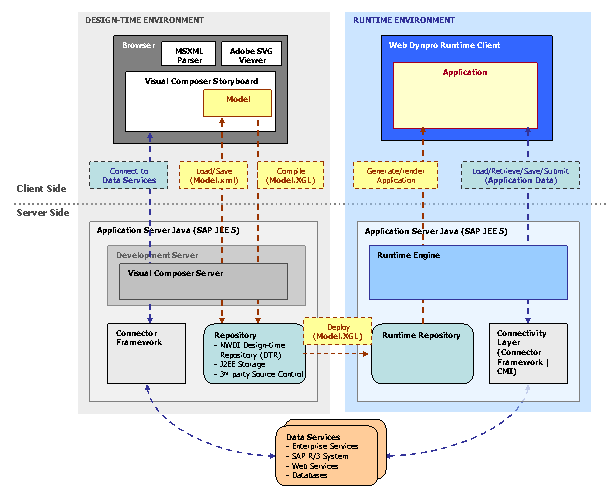
All server-side components are installed on a single host in both the development and production environments; they differ only in configuration.
Connectivity to the back-end systems is provided by the connector framework layer, as follows:
System |
Design Time |
Runtime (Web Dynpro) |
|---|---|---|
ERP |
Connector framework |
Connector framework |
Web services |
Connector framework |
Connector framework |
Enterprise services/UDDI |
Connector framework |
Connector framework |
Kit Extensions
Visual Composer Storyboard can be extended through use of dedicated kits, which extend both client-side and server-side functionality. This security guide relates to the Visual Composer core kits (which are part of the default installation) and the Web Dynpro for Visual Composer runtime. Other kits are BI and Voice (which connects to a third-party voice server). Each kit potentially presents a set of security vulnerabilities that are addressed in the Security Guide for that kit.