 Network and Communication Security
Your network infrastructure is important to protect your systems. Your network must support the communication means necessary for your business requirements, without allowing unauthorized access. A clearly-defined network topology can eliminate many security risks such as operating-system errors, application level software errors and potential attacks on your network by eavesdropping.
Intruders try to gain access to back-end databases or files. Hence you should not compromise on the security of these systems. However if you can protect your systems on the Local Area Network (LAN) then you can ensure that the intruders cannot exploit known bugs or security holes in network services on the servers.
Server Ports
Depending on how you host your voice gateway, your servers may be accessible through ports, in which case, security measures are required. There are two ways of hosting the gateway to your voice-enabled applications:
Internal hosting
The voice gateway is hosted in-house behind the firewall and you do not need outside ports.
External hosting
The voice gateway is hosted by a third-party. For example, a telecom company.
In this case you have to open the corresponding ports for communication with your NetWeaver Web server. This means that you have to use the http or https protocol, for which the same rules apply as for standard Web-based applications.
Network Topology
The following figure shows the secure network topology for voice-based applications:
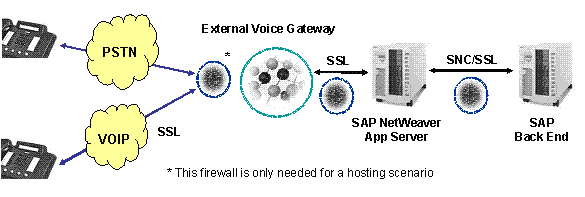
The following communication paths are relevant for encryption:
PSTN (Public Switched Telephone Network)
There are means to encrypt the communication path to telephones, however they depend on the service and telephone provider.
 Recommendation
We recommend that you contact the appropriate services vendor.
End of the recommendation.VoiceXML gateway and SAP NW App Server
The SAP NetWeaver Application Server Java stack supports SSL/HTTPS. You can use SSL to encrypt this communication path if your VoiceXML Gateway supports SSL.
RecommendationWe recommend that you contact the third-party VoiceXML gateway vendor.
End of the recommendation.SAP NetWeaver Application Server Java stack and an SAP ABAP or a non-SAP system
The SAP NetWeaver Application Server Java stack supports SSL/HTTPS and SNC to encrypt communication paths to SAP systems.
RecommendationWe recommend that you refer the documentation of non-SAP system to know the protocols supported for secure communication paths.
End of the recommendation.
Communication Destinations
Your voice application communicates with SAP back ends using SAP Java or SAP ABAP functionality. Each have their own technical users:
Java:
These have service type users on the Java stack.
Your voice application, running in the SAP NetWeaver Composition Environment (system A), calls back-end functions running on an SAP Java stack (system B):
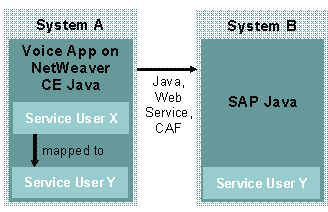
You maintain a service user that is used by your voice application (service user X on system A). You must also map a service user on this system (service user Y on system A) that your voice application can call.
ABAP:
These are communication users on the ABAP stack.
Your voice application, running in the SAP NetWeaver Composition Environment (system A), calls back-end functions running on an SAP ABAP stack (system C).
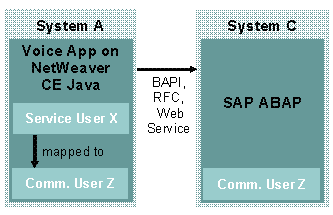
You maintain a service user that is used by your voice application (service user X on system A). You must also map a communication user on this system (communication user Z on system A) that your voice application can call.
More information: Maintaining RFC Destinations
 Note
Note
These technical users cannot be used for direct dialog logon.
Deleting Service Users
When you install the Voice Kit, the system checks whether a service user for your voice applications exists on the SAP NetWeaver Composition Environment (CE) from a previous Voice Kit installation:
If so, no new service users are created.
If there is no such user, the system creates a service user called voice_rt_service. In the above- mentioned examples this is the service user A.
If you uninstall the Voice Kit at a later date, you must manually delete the voice_rt_service user.
Further Information
For more information, refer to the sections of the SAP NetWeaver Security Guide listed in the tables below:
Security Aspects of the SAP NetWeaver Platform
Topic |
Document |
Technical system landscape |
Technical System Landscape |
User administration and authentication |
User Administration and Authentication |
Network and transport layer security |
Security Aspects for Connectivity and Interoperability
Topic |
Document |
Remote Function Calls (RFC) or Internet Communication Framework (ICF) |
RFC/ICF Security Guide |
Application Link Enabling (ALE) |
|
Connectivity with AS Java |
|
Web services |
Web Services Security |