
 Monitoring Sequences

Purpose
Web Services Reliable Messaging (WSRM) ensures that message exchange between a service provider and a service consumer is completed without fault. Here messages are combined into sequences. The reliability of sequence transmission is adopted by the Web service runtime. Using the analysis tools of the sequence monitor, you can find and remove any errors that occur during transmission.
You use the sequence monitor in the following cases:
· To monitor the sequence status.
· To end or restart sequences with errors.
For more information, see About Sequences.
Prerequisites
· You have started SAP NetWeaver Administrator and have chosen SOA Management → Monitoring → Sequence Monitoring.
· The user account you use is allowed to access the sequence monitor.
For more
information, see
 Monitoring
Roles.
Monitoring
Roles.
Features
The sequence monitor comprises three areas.
● Selection Criteria
● Sequence Overview
● Sequence Detail
Selection Criteria
This area contains the following sections:
● Common Criteria
● Additional Criteria
Inputs in the fields under Additional Criteria invalidate the inputs under General Criteria. The Location field is an exception.
For more information, see Choosing Selection Criteria.
Sequence Overview
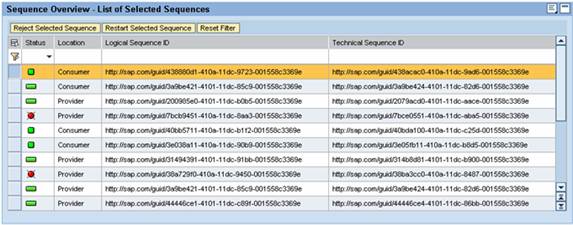
In the sequence overview, you see a list of the selected sequences. When you choose a sequence, more details are displayed. It is possible to end or restart individual sequences.
For more information, see Checking the Sequence Overview.
Sequence Details
In the Sequence Header tab, you can find general information on the messages contained in the sequences.
In the Messages tab, you can see details on the status of the messages contained in the sequence.
For more information, see Analysis of Sequence Details.