Creating an Enterprise Application DC

To deploy your EJB to the server, you need to package it with an Enterprise Application development component.
Procedure
To create a new Development Component based project of type Enterprise Application, proceed as follows:
- Choose the menu path File → New → Project. A New Project Wizard appears.
- Choose Development Infrastructure → Development Component. Choose Next.
- Expand the root node with the vendor ID (for example: sap.com ) and select J2EE, and then Enterprise Application. Choose Next.
- Expand the node Local Development → MyComponents. Choose Next.
- Enter studsapp in the Name field. Choose Next.
- Select 5.0 for Java EE version. Choose Next.
- Assign the reference to the EJB DC project you have created in the last procedure and choose Finish.
Result
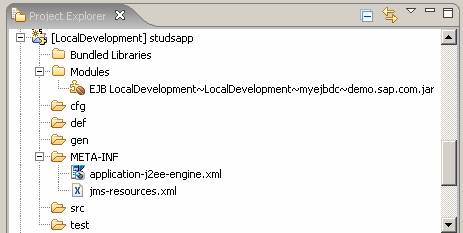
The wizard generates a new Enterprise Application DC. The resulting project structure is displayed in the Project Explorer view.