
 Defining Activity Mappings

Use
Each activity has input, output and local parameters. You have to define mappings between the activity’s local parameters and the input and output parameters of its children. For this purpose, you use the IGPModifiableBlockStructureItem interface.
You also need to define “input-to-local” and “local-to-output” mappings to ensure correct parameter passing within the activity itself. Mapping rules in this case are accessible through the IGPModifiableActivity interface.
Prerequisites
● You have instantiated the IGPDesigntimeUpdateManager.
See Instantiating the Design Time Manager.
● You have implemented an activity containing child activities.
See Creating GP Development Objects.
Defining Mappings Between Activities

...
1. Copy the input parameters of each child activity to the local context of the parent activity.

Parent activities should usually inherit parameters from their child activities, although you can define additional ones if you need them. Also, you can copy to local context only those parameters that you need to work with, that is, the ones that have to be passed between the different activities and need consolidation.
The procedure for copying parameters to local context is complex, since you cannot overwrite the local parameter context of the activity. Instead, you have to add a new set of parameters to the existing structures and attributes.

Copying Parameters to Local Context |
import com.sap.caf.eu.gp.process.api.IGPModifiableBlockStructureItem; import com.sap.caf.eu.gp.process.api.IGPModifiableBlock; import com.sap.caf.eu.gp.structure.api.IGPStructureInfo; import com.sap.caf.eu.gp.structure.api.IGPAttributeInfo; import java.util.Collection; import java.util.Iterator;
// retrieve block local context IGPStructureInfo local = block.getLocalParameters();
// retrieve an action item in the block IGPModifiableBlockStructureItem item = block.getModifiableStructure().getModifiableItem(0);
// retrieve action’s input context IGPStructureInfo in = item.getActivity().getInputParameters();
// retrieve input attributes Collection attributes = in.getAttributes(); // for each attribute in the list for (Iterator iter = attributes.iterator(); iter.hasNext();) { IGPAttributeInfo attribute = (IGPAttributeInfo) iter.next(); // create a corresponding attribute in local structure IGPAttributeInfo aCopy = local.addAttribute(attribute.getTechName(), attribute.getNamespace(), attribute.getType()); // set multiplicity of the new attribute aCopy.setMultiplicity(attribute.getMultiplicity());}
// retrieve input substructures Collection structures = in.getStructures(); // for each structure in the list for (Iterator iter = structures.iterator(); iter.hasNext();) { IGPStructureInfo struct = (IGPStructureInfo) iter.next(); // create a corresponding structure in local structure IGPStructureInfo sCopy = local.addStructure(struct.getTechName(), struct.getNamespace()); // set multiplicity of the new structure sCopy.setMultiplicity(struct.getMultiplicity());
// use recursion to copy content of structure ... } // finally, save the modified local context block.setLocalParameters(local);
|
2. Copy the output parameters of each child activity to the local context of the parent activity. Refer to the code in step 1 and use IGPStructureInfo out = item.getActivity().getOutputParameters() instead.
You now have two equivalent sets of parameters that you can map in the next steps.
3. For each child activity in the parent activity, you may want to define several types of mapping.
Depending on your needs, you can either map parameters between the child and the parent, or map parameters between the consecutive child activities. Here we assume that you need to consolidate the parameters of the child activities to ensure correct data flow within the parent activity (block or process).
...
a. Map local parameters of the parent to the first child’s input
Mapping Local to Input Parameters |
import com.sap.caf.eu.gp.structure.api.IGPMappingGroup;
IGPModifiableBlockStructureItem item = block.getModifiableStructure().getModifiableItem(0); IGPMappingGroup inMap = item.getInputMapping();
// map block’s local parameters to action’s input parameters inMap.addMappingRule( new String[] {"1_param1_in","1_param2_in","1_param3_in"}, new String[] {"1_param1_in","1_param2_in","1_param3_in"} ); item.setInputMapping(inMap);
|
b. Map the last child’s output to the local parameters of the parent.
Mapping Output to Local Parameters |
IGPMappingGroup outMap = lastItem.getOutputMapping();
// map output parameters of last action to block’s local parameters outMap.addMappingRule( new String[]{"last_param1_out"}, new String[]{"last_param1_out"} ); lastItem.setOutputMapping(outMap);
|
c. Map (consolidate) parameters between the inner child activities.
For this purpose, the parameters you want to map must be equivalent:
■ Attributes must have the same type and multiplicity
■ Structures may have different technical names, but must be identical in multiplicity, number and type of children. Their inner organization should also be identical.
In the local context of the parent activity you need to create a parameter (structure or attribute) identical to the ones you want to map. You can use the copy procedure listed in step 1.
As a technical name of the new parameter, specify the name under which you want to consolidate the child parameters, for example param1_cons.
Consolidating Parameters Between Actions |
// create a new parameter in the local context of the block ...
// add a new mapping rule to the output group of the first activity IGPMappingGroup outMap = item1.getOutputMapping();
String[] src = {"1_param1_out"}; String[] dest = {"param1_cons"}; outMap.addMappingRule( src, dest ); // save mapping information item1.setOutputMapping(outMap);
// add a new mapping rule to the input group of the second activity IGPMappingGroup inMap = item2.getInputMapping();
String[] src = {"param1_cons"}; String[] dest = {"2_param1_in"}; inMap.addMappingRule( src, dest );
// save mapping information item2.setInputMapping(inMap);
|
Defining Mappings Within an Activity
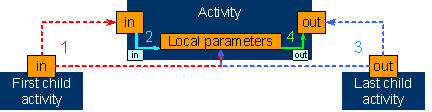
...
1. Copy the input parameters of the first child activity to the input context of the parent activity.
We assume that you have already copied its parameters to the local context as described in step 1 of the previous procedure.
Copying Parameters to Input Context |
// retrieve the first item in the block IGPModifiableBlockStructureItem item = block.getModifiableStructure().getModifiableItem(0);
// retrieve the input of the first item IGPStructureInfo in = item.getActivity().getInputParameters();
// copy it to the block input block.setInputParameters(in);
|
2. Map the newly-created input parameters to the local context of the parent activity.
Mapping Input to Local Parameters |
// retrieve block input mapping group IGPMappingGroup inMap = block.getInputMappingGroup(); // add new mapping rule to map identical input and local parameters inMap.addMappingRule( new String[] {"1_param1_in","1_param2_in","1_param_3_in"}, new String[]{"1_param1_in","1_param2_in","1_param_3_in"} ); // save mapping information block.setInputMappingGroup(inMap);
|
3. Copy the output parameters of the last child activity to the output context of the parent activity. You must also make a copy in the local context. Refer to step 2 of the previous procedure.
Copying Parameters to Output Context |
// retrieve the last item in the block // and its output IGPStructureInfo out = item.getActivity().getOutputParameters();
// copy it to the block output block.setOutputParameters(out);
|
4. Map the corresponding set of local parameters to the output parameters of the activity.
Mapping Local to Output Parameters |
// retrieve block output mapping group IGPMappingGroup outMap = block.getOutputMappingGroup(); // add new mapping rule to map identical output and local parameters outMap.addMappingRule( new String[]{"last_param1_out"}, new String[]{"last_param1_out"} ); // save mapping information block.setOutputMappingGroup(outMap);
|
For more information on how to map parameters between callable objects and actions, refer to Defining Callable Object Mappings.