
 Table View

Definition
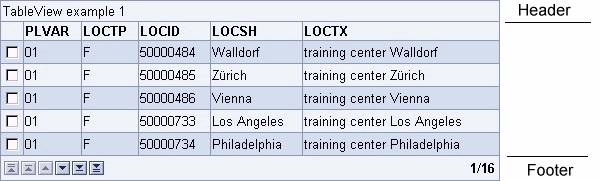
Arrangement of data - text, images, links, other tables etc. - into rows and columns. TableView rows may be grouped into a head, foot and body section. The tableView supplies also navigation buttons which allow browsing thru the table.
· cellDisabled
Enables or disables a control in the specified cell. Currently the inputField control is the only control that can be disabled/enabled.
· cellHAlignment
Sets the horizontal alignment of the specified cell. Possible values are:
¡ LEFT
Left justifies the content of the cell.
¡ RIGHT
Right justifies the content of the cell.
¡ CENTER
Centers the content of the cell.
¡ CHAR
Aligns text around a specific character. Not supported by all web clients.
¡ JUSTIFY
Sets text in the cell left and right aligned. Not supported by all web clients.
· cellHeaderVisible
A boolean value that controls the visibility of the header of the columns. If the value is set to "FALSE" the header of the columns is not rendered.
· cellInvalid
This attribute can set the display of a control in the specified cell as "invalid" - to indicate the user that the data in this field is not correct. Currently the inputField control is the only control that can be "invalid".
· cellRenderer
Sets a cell renderer for the tableView control.
· cellType
Sets the display type for the specified cell. The cell type can be following controls:
¡ BUTTON
¡ IMAGE
¡ IMAGELINK
¡ INPUT
¡ LINK
¡ TEXT
¡ USER
¡ User defined cell type.
· cellVAlignment
Sets the vertical alignment of the specified cell. Possible values are:
¡ BASELINE
The content of the cell is aligned on the baseline line of the cell (or bottom when no baseline exits).
¡ BOTTOM
The content of the cell is aligned to the bottom line of the cell.
¡ MIDDLE
The content of the cell is aligned to the middle of the cell height.
¡ TOP
The content of the cell is aligned to the top line of the cell.
· colspanForCell
Sets the column span (width) of the specified cell.
· columnAt
Sets a TableColumn for the specified column.
· columnCount
Defines the amount of columns for the tableView.
· columnHAlignment
Sets the horizontal alignment of the specified column.
· columnInvisible
Sets a column with the specified key invisible.
· columnName
Sets the title of the specified column.
· columnType
Sets the display type for the specified column. The column type can be following controls:
¡ BUTTON
¡ IMAGE
¡ IMAGELINK
¡ INPUT
¡ LINK
¡ TEXT
¡ USER
¡ User defined column type.
· columnVAlignment
Sets the vertical alignment of the specified column.
· design
Defines the look of the table
¡ ALTERNATING
The rows of the table entries are colored alternating.
¡ STANDARD
The background of tableView is uniformly colored.
¡ TRANSPARENT
The tableView has no background.
· emptyTableText
Sets the text when the table model contains no data - is empty.
· fillUpEmptyRows
A boolean value. If set to "TRUE" the tableView has always the height set by the 'visibleRowCount' attribute, regardless of the available table entries. The not available table entries will be filled up with empty lines and according the 'design' attribute.
If set to "FALSE" the tableView height is adjusted to the available table entries.
· footerRenderer
Sets a renderer for the table footer.
· footerVisible
A boolean value that controls the footer row. If set to "FALSE" the footer row including the navigation buttons is invisible.
· headerCellRenderer
Sets a renderer for the table header. The 'headerCellRenderer' renders the header column by column, so you have access to every column header.
· headerRenderer
Sets a renderer for the table header.
· headerText
Defines the headline of the tableView.
· headerVisible
A boolean value that controls the visibility of the header line. If the value is set to "FALSE" the header is not rendered and the table view starts with the cell header row. If the cell header row is invisible also, the table view starts with the data rows.
· id
Identification name of the tableView.
· keyColumn
Sets the specified column as key column.
· linkColumnKey
Sets the specified column as link
· model
Defines the model which provides the tableView with data. How to setup a TableViewModel.
· navigationMode
Controls the navigation buttons in the footer row.
¡ BYPAGE
Four navigation buttons are displayed that allow browsing page up, page down, first and last table entry
¡ BYLINE
Two additional buttons are displayed allowing single row up and down.
· onCellClick
Defines the event handling method that will be processed when the user clicks on one cell of the tableView. The 'onCellClick' event is set for an entire column. You can specify the column by column index or column key. For details see how to setup and work with the onCellClick event.
· onClientCellClick
Defines a Javascript fragment that is executed when the user clicks on one cell of the tableView. The 'onClientCellClick' event is set for an entire column. You can specify the column by column index or column key.
· onClientRowSelection
Defines a Javascript fragment that is executed when the user clicks on the radiobutton button in the first column.
· onHeaderClick
Defines the event handling method that will be processed when the user clicks on the header of the table. For details see how to setup and work with the onHeaderClick event.
· onNavigate
Defines the event handling method that will be processed when the user clicks on the navigation buttons. For details see how to setup and work with the onNavigate event.
· onRowSelection
Defines the event handling method that will be processed when the user clicks on the radiobutton button in the first column. The radiobutton is visible when the 'selectionMode' is set to "SINGLESELECT". The method com.sap.htmlb.event.TableSelectionEvent.getRowIndex() can be used to retrieve the index of the row that initiated the event. For details see how to setup and work with the onRowSelection event.
· rowCount
Defines the maximum record that is displayed together with the actual position (for example, 3/16 - meaning: actual position 3, maximum records 16) on the right side of the footer. If 'rowCount' is not specified the number of records in the model define the value.
· rowRenderer
Sets a row renderer.
· rowSelectable
Defines if the checkbox or radiobutton (dependend on the 'selectionMode') of the specified row, can be selected.
· rowspanForCell
Sets the row span for the specified cell.
· rowVAlignment
Sets the vertical alignment for a row.
· selectionMode
Defines how the table entries can be selected
¡ MULTISELECT
A checkbox is displayed on every row at the first column of the table. According to the nature of the checkbox multiple columns can be selected at a time.
¡ NONE
No selection possible (no checkbox and no radiobutton).
¡ SINGLESELECT
A radiobutton is displayed on every row at the first column of the table. According to the nature of the radiobutton one column can be selected at a time. Together with this attribute 'onRowSelection' attribute can be set so that an event is fired, when the user clicks on the radiobutton.
· styleForCell
Sets the style for the specified cell. Style can be BADVALUE, GOODVALUE, CRITICALVALUE to name a few.
· summary
Sets the summary.
· tableHAlignment
Sets the horizontal alignment for the entire tableView control.
· userTypeCellRenderer
Set a user defined cell renderer.
· visibleFirstRow
Defines the number of the table entry that is displayed in the first row of the tableView. All subsequent entries are displayed accordingly.
· visibleRowCount
Defines the visible rows of the tableView. If 'fillUpEmptyRows' is set to "TRUE", all rows specified with 'visibleRowCount' are displayed. The default for 'visibleRowCount' is the number of table entries supplied by the model.
· width
Defines the width of tableView.
Attributes |
M |
Values |
Usage |
cellDisabled |
|
FALSE
(d) |
Taglib Classlib |
cellHAlignment |
|
CENTER |
Taglib Classlib |
cellHeaderVisible |
|
FALSE |
Taglib Classlib |
cellInvalid |
|
FALSE
(d) |
Taglib Classlib |
cellRenderer |
|
Component |
Taglib Classlib |
cellType |
|
BUTTON |
Taglib Classlib |
cellVAlignment |
|
BASELINE |
Taglib Classlib |
colspanForCell |
|
Numeric (1) |
Taglib Classlib |
columnAt |
|
Numeric |
Taglib Classlib |
columnCount |
|
Numeric (1) |
Taglib Classlib |
columnHAlignment |
|
CENTER |
Taglib Classlib |
columnInvisible |
|
String (cs) |
Taglib Classlib |
columnName |
|
String (cs) |
Taglib Classlib |
columnType |
|
BUTTON |
Taglib Classlib |
columnVAlignment |
|
BASELINE |
Taglib Classlib |
design |
|
STANDARD (d) |
Taglib Classlib |
emptyTableText |
|
String |
Taglib Classlib |
fillUpEmptyRows |
|
FALSE |
Taglib Classlib |
footerRenderer |
|
Component |
Taglib Classlib |
footerVisible |
|
FALSE |
Taglib Classlib |
headerCellRenderer |
|
Component |
Taglib Classlib |
headerRenderer |
|
Component |
Taglib Classlib |
headerText |
|
String |
Taglib Classlib |
headerVisible |
|
FALSE |
Taglib Classlib |
id |
* |
String (cs) |
Taglib Classlib |
keyColumn |
|
Numeric (defined by model) |
Taglib Classlib |
linkColumnKey |
|
|
Taglib Classlib |
|
Component |
Taglib Classlib |
|
navigationMode |
|
BYPAGE (d) |
Taglib Classlib |
rowCount |
|
Numeric (defined by model) |
Taglib Classlib |
rowRenderer |
|
Component |
Taglib Classlib |
rowSelectable |
|
FALSE |
Taglib Classlib |
rowspanForCell |
|
Numeric |
Taglib Classlib |
rowVAlignment |
|
BASELINE |
Taglib Classlib |
selectionMode |
|
MULTISELECT (d) |
Taglib Classlib |
styleForCell |
|
BADVALUE_DARK |
Taglib Classlib |
summary |
|
String |
Taglib Classlib |
tableHAlignment |
|
CENTER |
Taglib Classlib |
userTypeCellRenderer |
|
Component |
Taglib Classlib |
visibleFirstRow |
|
Numeric (1) |
Taglib Classlib |
visibleRowCount |
|
Numeric (defined by model) |
Taglib Classlib |
width |
|
Unit |
Taglib Classlib |
Events |
M |
Values |
Usage |
|
String (cs) |
Taglib Classlib |
|
|
String (cs) |
Taglib Classlib |
|
|
String (cs) |
Taglib Classlib |
|
|
String (cs) |
Taglib Classlib |
|
|
String (cs) |
Taglib Classlib |
|
|
String (cs) |
Taglib Classlib |
Example
using the taglib
<hbj:tableView |
using the classlib (For information about setting up the bean, see DefaultTableViewModel)
Form form = (Form) this.getForm(); |
Result
