
 Defining the Logon Procedure

Use
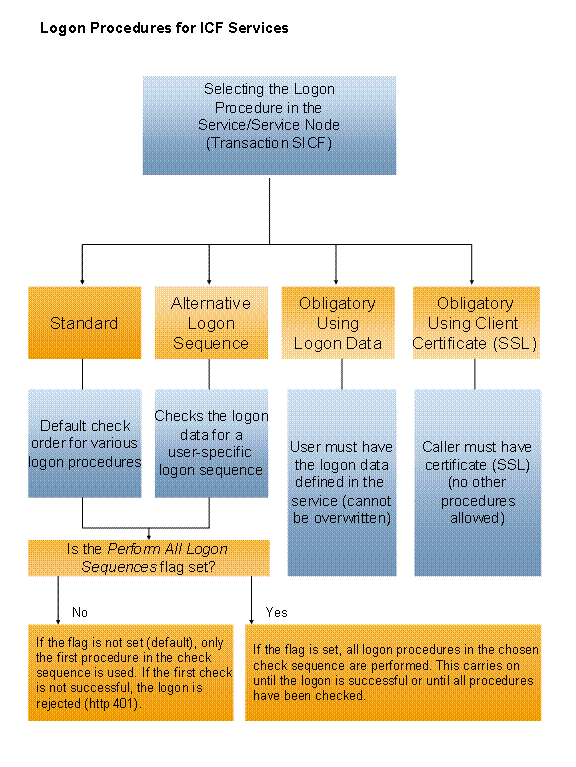
You can choose from several different logon procedures when using a HTTP request to log on to SAP Web AS. You can configure the procedure individually for each service or for an entire service node, including all its services.
Prerequisites
At least one HTTP request handler must have been entered for the service or service node.
Features
· For each ICF service, you can specify which logon procedure it has to be executed with. The following options are available:
a. Standard (default): When you log on, various checks are run in a specified order.
b. Alternative Logon Order: If you select this option, you can choose the checks yourself and specify the order in which they run.
c. Logon Data Required: Only the logon data specified in the service (User, Password, Client, and Language) is used to check the logon.
d. Client Certificate (SSL) Required: Logons are performed using X 509 Client Certificate only.

You can use only one of these options for each service or service node.
· If you use the standard or alternative logon procedures, you can use the All Logons checkbox to specify whether the appropriate checks are run (in the specified order) until one of the logon procedures is successful (checkbox activated), or whether the logon is rejected with a message as soon as a logon procedure fails (checkbox not activated).
For each service, you can also choose the Logon via SAMLoption. With SAML (Security Assertion Markup Language), you can use XML-based single sign-on mechanisms for your services.
· For each service, you can define an individual response page that appears if the logon fails.
Integration
More Information
● Login with Client Certificate
● Logon Using Basic Authentication
● Determining the Logon Language
You can find information about making ICF communications secure in:
 RFC/ICF Security
Guide
RFC/ICF Security
Guide