
 Header Variables

Use
AS Java supports the use of header variables for authentication and Single Sign-On. Thereby, you can use an external Web Access Management (WAM) product to authenticate your users. The WAM product returns an authenticated user ID as part of the HTTP header. Users only have to authenticate once against the external product and can then access applications on the AS Java, such as the portal, with Single Sign-On.
For an overview of the process flow for header variables authentication, see the figure below:
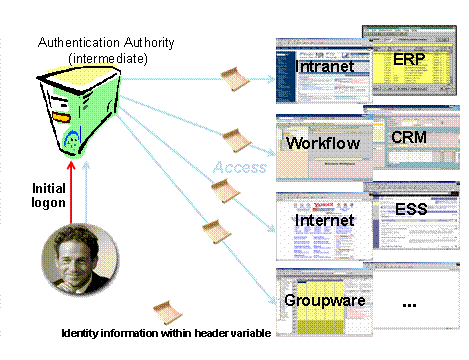
Process Flow for Authentication with Header Variables
Authentication with an external WAM product works as follows:
● The WAM product authenticates the user and returns an authenticated user ID to the AS Java as part of the HTTP header.
● The AS Java compares this returned user ID against the user data sources and grants the user access to the required application upon finding a match. The user must exist in the UME user data sources.
The AS Java provides a JAAS login module HeaderVariableLoginModule that reads a user ID from the HTTP header variable and then uses this user ID to authenticate the user. You can use this login module for user authentication, for example if you are already using an external WAM product to protect other resources in your company, or if you wish to use authentication mechanisms that are not directly used by the AS Java, such as token cards or biometrics.
Prerequisites
● To use an external product with the header variable login module for authentication, you must use an external intermediary server for access to the AS Java. All requests must pass through the external intermediary server.
● The user ID that the external product returns in the HTTP header must exist in the user management data sources.
Security Considerations
If appropriate security measures are not taken, authentication using header variables can allow attackers to impersonate a user by sending a request with a user ID in the appropriate header variable to the AS Java. To prevent this, you should do the following:
● Using appropriate measures, make sure that the HTTP and HTTPS ports of the AS Java or portal cannot be directly accessed by client Web browsers, for example by using firewalls. The AS Java should only be accessed through its intermediary server. This prevents attackers from bypassing the intermediary server and impersonating authenticated users.
● If it is not possible to block the HTTP and HTTPS ports of the AS Java, you must configure Secure Sockets Layer (SSL) with mutual authentication between the intermediary server that authenticates the user and the AS Java. In this way, the AS Java can trust the user information contained in the header variable.
To set this
up, you must add the certificate of the intermediary server to the list of
trusted root certificates in the J2EE Engine. Then you configure the J2EE
Engine to only accept incoming requests that are signed with this certificate.
For more information, see
 Using SSL With an Intermediary
Server.
Using SSL With an Intermediary
Server.
●
If you are using
authentication with header variables in the portal, you can configure what
happens when users log off from the portal. By default users are redirected to
the default logon screen after they log off. If the portal uses an external
Web access management tool to authenticate users, the portal logoff cannot
delete the session identifiers created by the external tool and users are
automatically logged on again, so it is impossible for them to log off the
portal. To prevent users from being automatically logged on again, you can
redirect users to a screen other than the default logon screen after they log
off the portal. For more information, see
Configuring the Portal
Logoff URL.
Configuration
The exact steps for setting up authentication with header variables depends on the product you use. In all cases you will need to adjust the login module stacks or templates of the applications to use header variable authentication.
For more information about configuring the use of Header Variables, see Using Header Variables.
...