Show TOC Start of Content Area

Object documentation Tree View  Locate the document in its SAP Library structure

Definition

A representation of hierarchical data (for example, directory and file names) as a graphical outline. Clicking expands or collapses elements of the outline. The item in a tree is called treeNode. The nesting depth of treeNodes define the hierarchy level.

The tree has no width attribute. Place the tree in a grid layout control if a certain width is required.

·        id

Identification name of the tree.

·        offsetForTreeNode

Defines the distance in pixel used by the control to indent the sub nodes.

·        onTreeClick

Defines the event handling method that will be processed when the user clicks on the tree. If 'onTreeClick' is specified, the event handling routine is called.

·        rootNode

Defines the root node of tree. This attribute is used when the tree structure is defined in a bean. The tree node in the bean is created with the command line:

TreeNode root = new TreeNode("root", "RootNode");

·        rootNodeIsVisible

A Boolean value that indicates if the rootNodeIsVisible.

·        title

Defines the headline of the tree.

·        tooltip

Defines the hint of the tree which is displayed as the mouse cursor passes over the tree, or as the mouse button is pressed but not released


Attributes

M

Values

Usage

id

*

String (cs)

Taglib
id="Tree1"

Classlib
setId ("Tree1")

offsetForTreeNode


Value

Taglib
offsetForTreeNode="20"

Classlib
setOffsetForTreeNode(20)

rootNode

+

String

Taglib
rootNode="TreeNode"

Classlib
setRootNode("TreeNode")

rootNodeIsVisible


FALSE
TRUE (d)

Taglib
rootNodeIsVisible="TRUE"

Classlib
setRootNodeIsVisible(true)

title


String

Taglib
title="Family tree"

Classlib
setTitle("Family tree")

tooltip


String

Taglib
tooltip="The Addams family"

Classlib
setTooltip("The Addams family")

+ 'rootNode' is required when the treeNode definition is not made immediately after the tree definition. In this case an error message - indicating that a tree without treeNodes is invalid - is generated.


Events

M

Values

Usage

onTreeClick


String (cs)

Taglib
No tag available

Classlib
setOnTreeClick("tree_click")


treeNode

Defines the items in the tree. The level of the tree is defined by the nesting depth. A treeNode with sub nodes has an indicator. The indicator is a triangle that shows if the node is expanded or collapsed .

·        encode

A boolean value that defines how the text is interpreted. HTML text formatting commands (for example, <h1>, <i> etc.) can be used to change the display of the text. If there are no formatting commands in the text string, the encode attribute has no effect.

Example:

text="<h1><i>Important</i></h1>"

encode = "false"     Browser output: This graphic is explained in the accompanying text
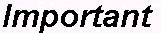
the text string is rendered by interpreting the formatting commands.


encode = "true"      Browser output: This graphic is explained in the accompanying text

the formatting commands are displayed and not interpreted.


·        hoverMenuId

Defines which hover menu is displayed for this tree node. You can define different trigger methods to display the hover menu. For more details, see hover menu.

·        id

Identification name of the tree.

·        onNodeClick

Defines the event handling method that will be processed when the user clicks on the text of the node.

·        onNodeClose

Defines the event handling method that will be processed when the user clicks on the node symbol. The node has to be initially defined in expanded mode (isOpen=true) in order to create the event. The event will than always occur when the user clicks on the symbol to expand the node. No event occurs when the tree node expands.

When the onNodeClose attribute is set, the tree node does not collapse on the web client. The event is sent to the server and the application has to take care about the further processing (for example, define the sub nodes of the tree node and set the tree node collapsed (isOpen=false).

·        onNodeExpand

Defines the event handling method that will be processed when the user clicks on the node symbol. The node has to be collapsed initially (isOpen=false) in order to create the event. The event will than always occur when the user clicks on the symbol to expand the node. No event occurs when the tree node collapses.

When the onNodeExpand attribute is set, the tree node does not expand on the web client. The event is sent to the server and the application has to take care about the further processing (for example, define the sub nodes of the tree node and set the tree node expanded (isOpen=true).


Note

The attributes onNodeExpand and onNodeClose are useful for trees with a lot of entries (transmission problems possible since the page could become pretty big) or if you want to have full control over the tree nodes and build the sub nodes dynamically. The server application has to take care about the modes of the node itself. If you have set an onNodeExpand attribute initially, you have to take care about following steps yourself when the event is fired:

§         Create the sub nodes.

§         Set the node status (isOpen=true).

§         Set the onNodeClose event to receive an event when the user closes the tree node again.

This works vice versa if you have set an onNodeClose attribute initially.

·        open

A Boolean value that indicates if the node is expanded or collapsed. This attribute only has an effect when the node has at least one sub node. If a node is expanded all sub nodes of the node are displayed. Symbols to indicate the node status:

Node expanded      This graphic is explained in the accompanying text

Node collapsed      This graphic is explained in the accompanying text

·        text

Defines the string of text displayed for the treeNode. HTML commands for text formatting (for example, <b> for bold characters) can be used..

·        tooltip

Defines the hint of the treeNode which is displayed as the mouse cursor passes over the treeNode, or as the mouse button is pressed but not released.


Attributes

M

Values

Usage

encode


FALSE
TRUE (d)

Taglib
No tag available

Classlib
setEncode (false)

hoverMenuId


String (cs)

Taglib
hoverMenuId="helpHover1"

Classlib
setHoverMenu(HoverMenu helpHover1)

id

*

String (cs)

Taglib
id="TreeNode"

Classlib
setId("TreeNode")

open


FALSE
TRUE (d)

Taglib
isOpen="FALSE"

Classlib
setOpen(false)

showExpander


FALSE
TRUE (d)

Taglib
No tag available

Classlib
setShowExpander (false)

text


String

Taglib
text="Gomez"

Classlib
setText("Gomez")

tooltip


String

Taglib
tooltip="1st Family member"

Classlib
setTooltip("1st Family member")


Events

M

Values

Usage

onNodeClick


String (cs)

Taglib
No tag available

Classlib
setOnNodeClick("onNodeClick")

onNodeClose


String (cs)

Taglib
No tag available

Classlib
setOnNodeClose("onNodeClose")

onNodeExpand


String (cs)

Taglib
No tag available

Classlib
setOnNodeExpand("onNodeExpand")


Example

using the taglib

   <hbj:tree
           id=
"S_Tree"
           
title="e-enviroment"
           
tooltip="enviroment of my computer"
           
>
           <hbj:treeNode
                    id=
"e_root"
                    
text="Desk"
                    
isOpen="true"
                    
tooltip="My desk"
           
>
               <hbj:treeNode
                        id=
"e_comp"
                        
text="Computer"
                        
isOpen="true"
               
>

                    <hbj:treeNode
                             id=
"e_comp_fl"
                             
text="Floppy"
                    
/>
                    <hbj:treeNode
                             id=
"e_comp_hd"
                             
text="Harddisk"
                    
/>
                    <hbj:treeNode

                             id=
"e_comp_dvd"
                             
text="DVD"
                    
/>
                </hbj:treeNode>

                <hbj:treeNode
                         id=
"e_net"
                         
text="Network"
                         
isOpen="true"
                         
tooltip="Company network"
                
>
                    <hbj:treeNode
                             id=
"n_lan"
                             
text="LAN"
                             
tooltip="Local Area Network"
                    
/>
                    <hbj:treeNode
                             id=
"n_wan"
                             
text="WAN"
                             
tooltip="Wide Area Network"
                    
/>
                    <hbj:treeNode
                             id=
"n_infra"
                             
text="Infrared"
                             
tooltip="Infrared connection"
                    
/>
                </hbj:treeNode>
           </hbj:treeNode>
   </hbj:tree>


using the classlib

    Form form = (Form) this.getForm();
    Tree tree = 
new Tree("S_Tree""e-enviroment");
    tree.setTooltip(
"enviroment of my computer");

    TreeNode root = 
new TreeNode("e_root""Desk");
    root.setOpen(
true);
    root.setTooltip(
"My desk");

    
// Tags at the second level -
    //       the entries are defined with the event "onName"
    // which is fired when the event is clicked.
    
TreeNode name1 = new TreeNode("e_comp""Computer", root);
    name1.setOnNodeClick(
"onName");
    TreeNode name2 = 
new TreeNode("e_net""Network", root);
    name2.setOnNodeClick(
"onName");
    TreeNode name11 = 
new TreeNode("e_comp_fl""Floppy", name1);
    name11.setOnNodeClick(
"onName");
    TreeNode name12 = 
new TreeNode("e_comp_hd""Harddisk", name1);
    name12.setOnNodeClick(
"onName");
    TreeNode name13 = 
new TreeNode("e_comp_dvd""DVD", name1);
    name13.setOnNodeClick(
"onName");
    TreeNode name21 = 
new TreeNode("n_lan""LAN", name2);
    name21.setOnNodeClick(
"onName");
    TreeNode name22 = 
new TreeNode("n_wan""WAN", name2);
    name22.setOnNodeClick(
"onName");
    TreeNode name23 = 
new TreeNode("n_infra""Infrared", name2);
    name23.setOnNodeClick(
"onName");

    tree.setRootNode(root);
    form.addComponent(tree);


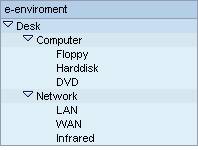
Result

This graphic is explained in the accompanying text


Note  Programming Tip

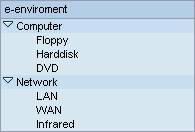
Usually the root node is visible and all sub nodes are displayed on the second level. If you make the root node invisible all sub nodes are displayed on first level.

Example

using the taglib

   <hbj:tree
           id=
"S_Tree"
           
title="e-enviroment"
           
tooltip="enviroment of my computer"
           
>
           <% S_Tree.setRootNodeIsVisible(false); %>

           <hbj:treeNode
                    id=
"e_root"
                    
text="Desk"
                    
isOpen="true"
                    
tooltip="My desk"
           
>
               <hbj:treeNode
                        id=
"e_comp"
                        
text="Computer"
                        
isOpen="true"
               
>
                    <hbj:treeNode
                             id=
"e_comp_fl"
                             
text="Floppy"
                    
/>
                    <hbj:treeNode
                             id=
"e_comp_hd"
                             
text="Harddisk"
                    
/>
                    <hbj:treeNode
                             id=
"e_comp_dvd"
                             
text="DVD"
                    
/>
                </hbj:treeNode>

                <hbj:treeNode
                         id=
"e_net"
                         
text="Network"
                         
isOpen="true"
                         
tooltip="Company network"
                
>
                    <hbj:treeNode
                             id=
"n_lan"
                             
text="LAN"
                             
tooltip="Local Area Network"
                    
/>
                    <hbj:treeNode
                             id=
"n_wan"
                             
text="WAN"
                             
tooltip="Wide Area Network"
                    
/>
                    <hbj:treeNode
                             id=
"n_infra"
                             
text="Infrared"
                             
tooltip="Infrared connection"
                    
/>
                </hbj:treeNode>

           </hbj:treeNode>
   </hbj:tree>


Result

This graphic is explained in the accompanying text


End of Content Area