
 How to Build a Content Provider

A content provider is a PAR with the following parts:
· Content Provider Service: A Java class that implements IContentProviderService, whose main task is to create the entities for this content provider.
For HTTP connectivity, you may also need to create a class that implements IHTTPAuthenticationManager in order to provide authentication information (for example, user name and password) for the connection.
For SOAP connectivity, you may also need to create a class that implements ISOAPMessageProcessorin order to process SOAP messages before they are sent and after they are received.
· Content Provider Entity: A Java class that implements IContentProviderEntityand ITransformationProviderEntity, whose main task is to create the URL for the HTTP request or the message for the SOAP request that retrieves the XML source. A content provider generally has many entities, and one Java class may provide the implementation for more than one entity.

You can create HTTP and SOAP entities for the same provider.
· Entity Transformer: An XSL file or SAX handler class that transforms the XML for rendering in an iView. Each entity must be assigned a transformer.
· Entity Portal Component: A portal component that can issue a HTTP or SOAP request, retrieve an XML source, transform the XML and render the information in the portal. Each entity must be assigned to an entity portal component.
You do not have to write any Java code to create an entity portal component. Your portal components are simply derived from the portal component defined in com.sap.portal.contentproviders.runtime.ContentProvidersComponent, and you create them simply by adding a <component> element in portalapp.xml.
The PAR file can contain any number of entities, transformers and portal components. However, for each XML data source provided by the content provider, you must assign one entity, one transformer and one component.
Workflow
The following are the steps required for creating a content provider:
...
1. Create a Content Provider Service
2. Create Content Provider Entities
3. Create Entity Portal Components
5. Create a Business Package (.sda file)
Prerequisites
· You have created a skeleton portal application project, with at least the following folders and files:
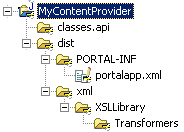
In Developer Studio, you can create the project in the usual way: Select New → Project, and then select Portal Application → Create a Portal Application Project. After the wizard creates the basic skeleton, add the folders that will hold the XML transformers (the xml folder and subfolders), as shown above.
For more information on the directory structure required for XML transformers, see Transformation Service.
· You understand how to create XML transformers. The XML transformers that are to be used with this content provider implementation are defined in the same PAR that defines the content provider implementation.
For more information, see Transformation Service.
· You understand how to create SOAP requests. The content provider framework uses standard Java classes for handling SOAP.
· The third-party content is in XML format and is exposed via the web, either via HTTP or SOAP requests.
The content provider framework is shipped with the portal as of SAP Enterprise Portal SP Stack 12.