
 Isolation Modes

A portal application can have one of the following isolation modes:
● Embedded
● URL
Embedded
The generated content for the portal application is embedded into the HTML code of the page without transformation. It is part of the page content. The page builder has no control over the appearance of the content.
The Embedded isolation mode has following features:
· The content of the portal applications is generated on the server without additional requests from the browser to the server.
· All portal applications on the page are called asynchronously on the server and sent in one page response to the client.
· Interactions with the portal application and reload actions reload the entire page. This results in flickering pages and lowers the performance when all portal applications are reloaded.
· The portal application window size is not controlled by the page. The window height parameter has no effect on the portal application when in Embedded mode.
· The page builder does not add scroll bars to the window of the portal application.
· Server (PRT) events and client (EPCF) events are supported.
Limitations
● HTMLB portal applications, which have to keep the state of input fields by form, lose the data of the input fields when other portal application forms on the page are submitted.
● Request parameters to keep the portal application state, are lost when other portal applications also keep the state.
● The portal application is part of the entire HTML code of page. Therefore, the script names of a portal application have to be unique to avoid collisions with other scripts of other portal applications on the page.
● The HTMLB ScrollContainer control with the height attribute set to 100% shrinks to zero height.
● External content (to the portal server) is very limited and must be handled with special care (for example, resources and cookie handling). URLIViewsRuntime cannot be used.
● Portal applications can only use the same codepage (charset) for the page (UTF-8).
Schematic
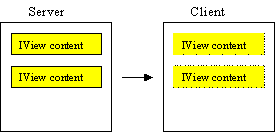
URL
The portal application is in an IFrame, isolated from the HTML code of the page.
The URL isolation mode has following features:
● The page builder generates the IFrame and sets the source attribute (src) to point to the URI of the portal application.
● The content of the portal application comes in an additional server request.
● Interactions with the portal application and reload actions affects only the portal application itself and not the entire page. The result is a flicker-free page and a performance advantage since not all portal applications are reloaded.
● The page builder has full control over the IFrame size. The page builder can set the portal application window height to fixed, full page or automatic according to the content of the portal application.
● The IFrame is generated with scroll bars.
● The width of portal application window can be controlled better because the IFrame has a horizontal scroll bar when the content exceeds the window width.
● Only client events (EPCF) are supported.
Schematic

Recommended Usage of Isolation Modes
● Use Embedded isolation when the portal applications on the page are connected with Portal Object Model (POM) events to other portal applications and need to repaint themselves, through the server, according to client actions.
● Use the Embedded isolation mode also for pages (such as the page property) and for portal applications that have no other portal application on the page (such as a navigation node).
● Portal pages should have Embedded isolation to save an additional request to fetch the page.
● If your content is large and the client rendering takes a long time, switch to URL isolation.
● Use URL isolation when you must present external content (not from the portal server) or several portal applications on a page that need different codepages (charsets).
● External content should use URL isolation.
● It is strongly recommended not to use Embedded isolation and URL isolation on the same page.

Always test your portal application in the portal environment. Execute it on a page in the portal framework with the other portal applications on the page.