
 Portal Content Translation

Purpose
The SAP NetWeaver portal provides a process for translating the text of portal objects, such as iViews, pages, worksets, roles, and systems. Multilingual object metadata for portal objects is stored in the database of the Portal Content Directory (PCD). If a property of a portal object has the type text attribute, it is marked as text and can be translated (for example, the name and description properties).
The translation process is supported by a translation administration tool consisting of both Translation Worklist Coordination and Worklist Translation environments. These are accessible by the content administration role by navigating as follows:
Content Administration → Portal Content Translation → Translation Worklist Coordination or Worklist Translation These tools are used to coordinate and to translate translation worklists.
Prerequisites
Language Transport
Texts have been transported to the system in which translation is to take place. More information: Performing Language Transports.
Permissions
To create and manage translation worklists, the translation coordinator must have at least read/write permission for the folder containing the relevant content.
To open and work on a worklist, the translator must have read/write permission for the worklist and the content to be translated.
More information: Portal Permissions
Process Flow
The following graphic shows the flow of the translation process for portal objects. The blue process steps belong to “Translation Worklist Coordination”, and the orange steps to “Worklist Translation”.
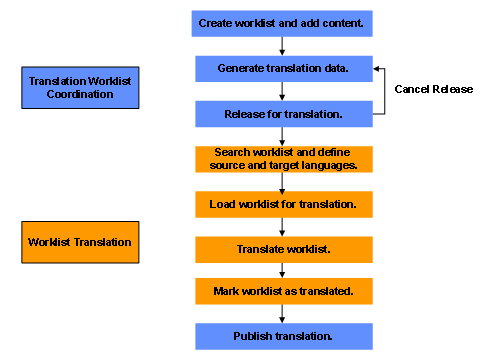
Result
At the end of the translation process, the publishing step automatically writes the text back to the objects to which they belong. The text is written to the Portal Content Directory (PCD).