
 Voice Application Architecture

Here is a high-level overview of SAP NetWeaver Voice, which shows how the systems and components are organized and how they interact:
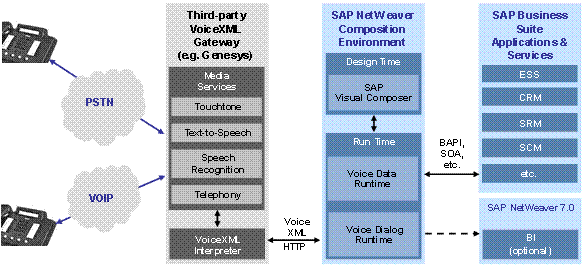

The grey systems are not part of NetWeaver Voice, but a third-party voice gateway and access to the telephony systems by a telephone number are necessary to implement a voice-enabled application.
This is what the abbreviations mean:
Abbreviation or Acronym |
Term |
Meaning or Comment |
PSTN |
Public switched telephony network |
Includes mobile as well as fixed telephones |
VOIP |
Voice over IP |
Internet or other IP-based telephony |
The following table contains a brief description of the major elements in the system landscape:
Element |
Role |
Third-party VoiceXML gateway |
The output of a NetWeaver Voice application is rendered on a VoiceXML-compliant third-party voice gateway. Calls come in to a VoiceXML gateway, which trigger HTTP or HTTPS requests to Voice Dialog Runtime. As opposed to HTML, in which the client (a Web browser) is provided by the customer, in a voice application, the client (a VoiceXML gateway) is under your control as the application provider. Therefore, there is explicit control of the client version and its security environment and nothing need be exposed outside the firewall. Voice applications do not require that callers have network access to a server. The only communication channel from the user is an audio stream from a telephone. Thus, avenues for potential security breaches are limited. |
Design-time component in the SAP NetWeaver Composition Environment (NW CE) |
The tool is implemented as a Voice Kit on top of Visual Composer and is thus part of the NetWeaver Composition Environment (NW CE). The tool uses Visual Composer services, such as back-end module search and repository integration. It produces a document that describes the attributes of the voice dialog, back-end access metadata, data manipulations, and information required for deployment. |
Runtime component in the SAP NetWeaver Composition Environment (NW CE) |
In response to incoming phone calls, the VoiceXML Gateway triggers the Voice Dialog Runtime with requests for execution. The Voice Dialog Runtime dynamically renders VoiceXML pages, returns them to the VoiceXML gateway, and processes their responses, usually by generating a new VoiceXML page. As dialogs are executed, the Voice Dialog Runtime makes requests for data through the Voice Data Runtime. These requests include setting and reading variable values, executing XGL expressions, accessing back-end systems, as well as other functions. The Voice Data Runtime uses services provided by Web Dynpro for Visual Composer (WD4VC) runtime, such as the expression engine and its back-end access functionality. The runtime component also includes a facility known as SpeakAs, which is used to render data values as natural-sounding audio. SpeakAs includes a set of concatenation algorithms expressed as Java classes and a large library of prerecorded audio fragments, which are combined dynamically to produce the utterances. |
SAP Business Suite applications and services |
Read or write access to business transactions are available through Enterprise Services, RFC, or BAPI. The design-time component makes use of the underlying search capabilities of Visual Composer to allow interactive browsing for back-end resources and access to their metadata. This includes support for BAPIs, Web services, BI services, and CAF (Composite Application Framework). |
SAP NetWeaver Business Intelligence (BI) |
The voice application writes detailed information about each call into to a database, which can be accessed through a set of Voice Reports defined in SAP BI 7.0. Detailed reporting through BI is optional. |