
 Generic Portal Application Layer (GPAL)
Repositories
Generic Portal Application Layer (GPAL)
Repositories

Definition
The GPAL repositories provide portal content administrators with access to content developed outside the portal. The content is exposed in technology-specific repositories in the Portal Catalog. You create Portal Content Directory (PCD) objects by copying items from the GPAL repositories and pasting them into the PCD.
For more information about the actions that you can perform in the GPAL repositories, see Working with GPAL Repositories.
Structure
GPAL repositories appear at the bottom of the Portal Catalog tree. The following GPAL repositories are available:
Repository |
Description |
Portal Applications |
Exposes application iViews and application layouts based on portal applications. |
Web Dynpro Applications |
Exposes application pages and application layouts based on Web Dynpro Java applications. This repository also exposes applications deployed from Visual Composer. For details, see VC Generated Content in this table. |
Portlet Applications |
Exposes application iViews based on portlets developed using the JSR-168 standard. |
VC Generated Content |
Exposes application iViews and application pages based on Visual Composer models created on standard SAP NetWeaver 7.1 platforms. When Visual Composer models are deployed using the hot deployment method, the application is also exposed automatically in the Web Dynpro Applications repository. The VC Generated Content repository is only displayed in the Portal Catalog after Visual Composer models have been deployed.
In SAP NetWeaver Composition Environment (NWCE), this repository is not available. In this case, the Visual Composer based applications are exposed in the Web Dynpro Applications repository. |

The GPAL repositories contain development components that hold the individual objects from which you can create portal content, for example, application pages and application iViews. You cannot use objects directly in the GPAL repositories; you must copy them first to the PCD.
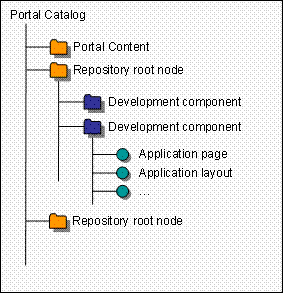
GPAL Repository Structure