
 Creating a Portal Application
Project
Creating a Portal Application
Project

All portal components and services are defined within a portal application.
Procedure
...
1. From the File menu, select New à Other. The New window is displayed.
2. Select Portal Application, and then Create a Portal Application Project. Click Next.
3. In the Project name textbox, enter a name for the project, such as myPortalProject.
The name of the project is also the name of the portal application, as well as the PAR file that is generated for the project.
Click Finish.
Result
The wizard creates the following:
● Directory structure for the project, as shown below:
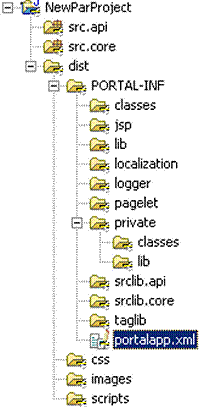
● A blank portalapp.xml file, that defines the application properties, as well as the components and services in the application.
For more information on portal applications and PAR files, see Portal Applications.