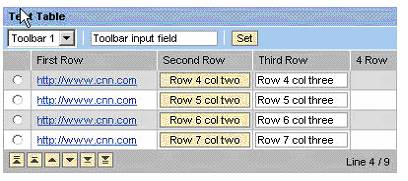
<?xml version="1.0"?>
<FlowLayout>
<Toolbar id="TestTableToolbar">
<ToolbarDropDownListBox id="tbrLstBox">
<parameter key="TestVal1" value="Toolbar 1"/>
<parameter key="TestVal2" value="Toolbar 2"/>
</ToolbarDropDownListBox>
<ToolbarSeparator/>
<ToolbarInputField id="tbrInpFld" value="Toolbar input field"/>
<ToolbarSeparator/>
<ToolbarButton id="tbrBttn" text="Set" value="SomeValue"/>
</Toolbar>
<TableView id="TestTable" width="400"
Summary="Table summary" footerVisible="true"
VisibleFirstRow="5" VisibleRowCount="4"
OnNavigate="NavigateTestTable" HeaderText="Test Table"
OnHeaderClick="DoClicked" toolbar="TestTableToolbar">
<parameter name="CellRenderer"
package="com.sap.portal.httpconnectivity.transformationservice"
class="xhtmlb.XHTMLBCellRenderer"/>
<parameter name="NavigationMode" value="BYLINE"
class="enum.TableNavigationMode"/>
<parameter name="Design" value="ALTERNATING"
class="enum.TableViewDesign"/>
<parameter name="SelectionMode" value="SINGLESELECT"
class="enum.TableSelectionMode"/>
<JCOTableViewModel>
<TableColumn index="0" name="FirstRow" title="First Row"
LinkClickTarget="_blank" LinkColumnKey="FirstRow"
TooltipForColumnHeader="First row tooltip">
<parameter name="Type" value="LINK" class="enum.TableColumnType"/>
</TableColumn>
<TableColumn index="1" name="SecondRow" title="Second Row"
CellsDragable="true">
<parameter name="Type" value="BUTTON" class="enum.TableColumnType"/>
</TableColumn>
<TableColumn index="2" name="ThirdRow" title="Third Row">
<parameter name="Type" value="INPUT" class="enum.TableColumnType"/>
<parameter name="DropTargetDesign" value="BORDERED"
class="enum.DropTargetDesign"/>
</TableColumn>
<TableColumn index="3" name="4Row" title="4 Row" OnDrop="DropOnRow4"
Width="400" LinkClickTarget="_blank" LinkColumnKey="4Row">
<parameter name="Type" value="TEXT" class="enum.TableColumnType"/>
<parameter name="DropTargetDesign" value="UNDERLINED"
class="enum.DropTargetDesign"/>
</TableColumn>
<TableRow>
<TableCell>Row one col one</TableCell>
<TableCell>Row one col two</TableCell>
<TableCell>Row one col three</TableCell>
<TableCell>Row one col three</TableCell>
</TableRow>
<TableRow>
<TableCell>Row two col ones</TableCell>
<TableCell>Row two col two</TableCell>
<TableCell colspanForCell="2">Row two col three</TableCell>
</TableRow>
<TableRow selectRow="true">
<TableCell>http://www.cnn.com</TableCell>
<TableCell>Row 3 col two</TableCell>
<TableCell>Row 3 col three</TableCell>
<TableCell useRenderer="true">
<![CDATA[<div style="font-size:x-small">
<a href="http://www.google.com">google</a>
</div>]]>
</TableCell>
</TableRow>
<TableRow>
<TableCell>http://www.cnn.com</TableCell>
<TableCell>Row 4 col two</TableCell>
<TableCell>Row 4 col three</TableCell>
</TableRow>
<TableRow>
<TableCell>http://www.cnn.com</TableCell>
<TableCell>Row 5 col two</TableCell>
<TableCell>Row 5 col three</TableCell>
</TableRow>
<TableRow>
<TableCell>http://www.cnn.com</TableCell>
<TableCell>Row 6 col two</TableCell>
<TableCell>Row 6 col three</TableCell>
</TableRow>
<TableRow>
<TableCell>http://www.cnn.com</TableCell>
<TableCell>Row 7 col two</TableCell>
<TableCell>Row 7 col three</TableCell>
</TableRow>
<TableRow>
<TableCell>http://www.cnn.com</TableCell>
<TableCell>Row 8 col two</TableCell>
<TableCell>Row 8col three</TableCell>
</TableRow>
<TableRow>
<TableCell>http://www.cnn.com</TableCell>
<TableCell>Row 9 col two</TableCell>
<TableCell>Row 9 col three</TableCell>
</TableRow>
</JCOTableViewModel>
</TableView>
</FlowLayout>
|

 XHTMLB
TableView Example
XHTMLB
TableView Example