Appending Summarized Lines
The following special statement allows you to summate entries in an internal table:
COLLECT wa INTO itab.
itab must have a flat line type, and all of the fields that are not part of the table key must have a numeric type (f, i, p). You specify the line wathat you want to add as a work area that is compatible with the line type of itab.
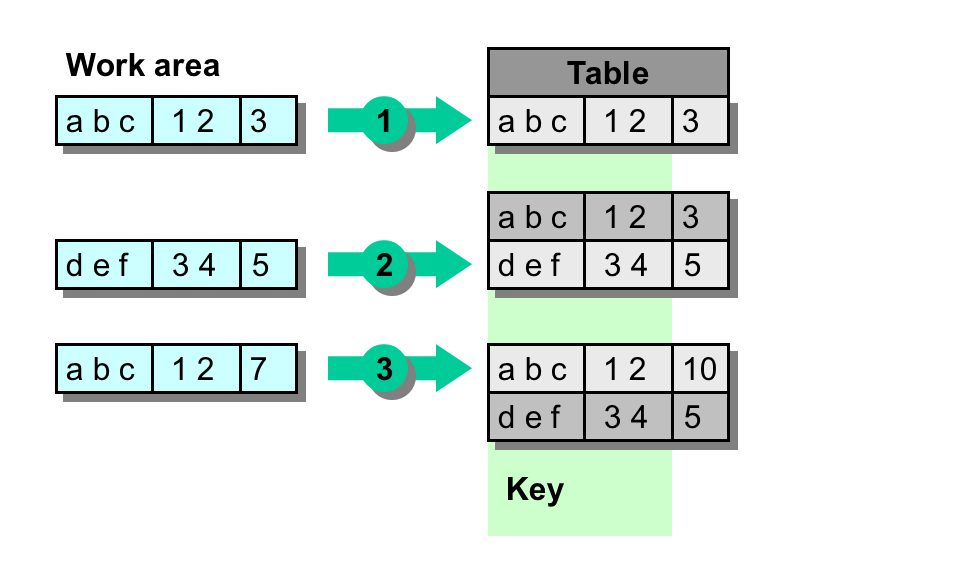
When the line is inserted, the system checks whether there is already a table entry that matches the key. If there is no corresponding entry already in the table, the COLLECT statement has the same effect as inserting the new line . If an entry with the same key already exists, the COLLECT statement does not append a new line, but adds the contents of the numeric fields in the work area to the contents of the numeric fields in the existing entry.
REPORT demo_int_tables_COLLECT .
DATA: BEGIN OF line, col1(3) TYPE c, col2(2) TYPE n, col3 TYPE i, END OF line.
DATA itab LIKE SORTED TABLE OF line WITH NON-UNIQUE KEY col1 col2.
line-col1 = 'abc'. line-col2 = '12'. line-col3 = 3.COLLECT line INTO itab.WRITE / sy-tabix.
line-col1 = 'def'. line-col2 = '34'. line-col3 = 5.COLLECT line INTO itab.WRITE / sy-tabix.
line-col1 = 'abc'. line-col2 = '12'. line-col3 = 7.COLLECT line INTO itab.WRITE / sy-tabix.
LOOP AT itab INTO line. WRITE: / line-col1, line-col2, line-col3.ENDLOOP.
The list output is:
1
2
1
abc 12 10
def 34 5
The example fills a sorted table. The first two COLLECT statements work like normal insertion statements. In the third COLLECTstatement, the first line of itab is modified. The following diagram shows the three steps: