Context
The channel monitor in SAP NetWeaver Administrator provides a channel ping for an adapter self- test. This chapter describes what you must do to enable the channel ping in your adapter implementation.
Procedure
- Each channel ping consists of several tests. Decide which tests make sense for your adapter implementation.
- For each test, provide a description and the test result.
The test result should be either OK, NOT_OK, or OK_WITH_WARNINGS.
- Provide an overall test result in class
com.sap.aii.utilxi.rtcheck.base.TestSuitResult .
-
If all tests are OK, provide an overall OK.
-
If an error occurs in any test, provide an overall NOT_OK.
-
If the channel status is inactive, provide an overall OK_WITH_WARNINGS.
- To enable the channel ping in your adapter implementation, use interface
com.sap.aii.af.service.administration.api.monitoring.ChannelSelfTestCallback and specifically method
testChannel .
This method accepts
a channel and a locale as input parameter, executes the tests on the given channel, and returns the results as object
TestSuitResult .
- Register the implementation via method
registerAdapter of the
AdapterRegistry .
Example
This is an example of the process flow if a user selects the channel ping in the channel monitor for a channel using the JMS adapter.
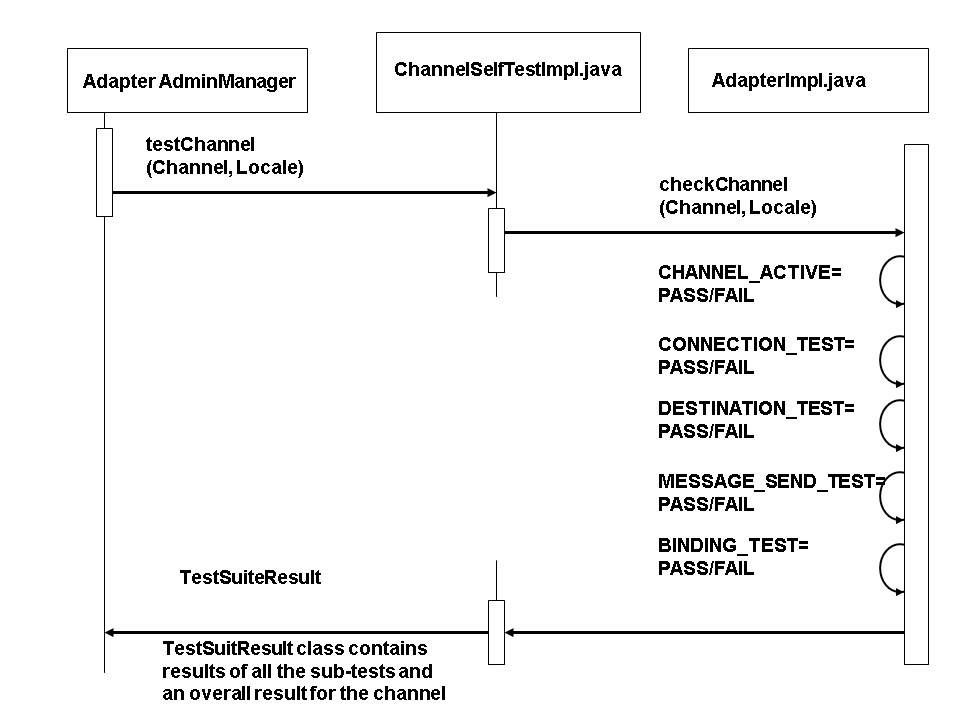
Figure 1:
Flow Control of Checking the Condition of a Channel
In the implementation of the JMS adapter, the following tests are executed:
-
Checking the channel status
-
Testing the connection
-
Creating a temporary destination
-
Sending a test message
-
Checking the channel bindings
