NavigationList
The NavigationList provides a navigation area and is used, for instance, in the Contextual Panel. Note that the NavigationList requires at least one recursive context node.
Example of the Visual Display
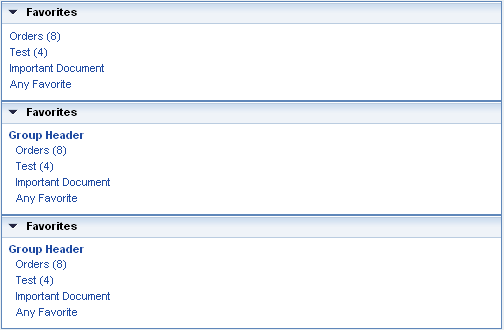
| Runtime Class |
CL_WD_NAVIGATION_LIST |
Properties in View Designer
| Name | Type | Initial Value | Bindable |
|---|---|---|---|
|
STRING |
(automatic) |
No |
|
|
I |
0 |
Yes |
|
|
WDUI_CONTEXT_MENU_BEHAVIOUR |
inherit |
No |
|
|
WDY_MD_UI_ELEMENT_REFERENCE |
No |
||
|
WDY_BOOLEAN |
true |
Yes |
|
|
WDY_BOOLEAN |
true |
Yes |
|
|
Context Node |
Mandatory |
||
|
Translatable text |
Yes |
||
|
Translatable text |
Yes |
||
|
WDUI_VISIBILITY |
visible |
Yes |
Aggregations in the View Designer
| Name | Cardinality | Type |
|---|---|---|
|
0..1 |
Events in View Designer
| Name |
|---|
Other properties that can be inherited are defined in the related higher-level classes. The related UI elements are:
For dynamic programming, the same properties, events, and aggregations as in the View Designer are available. But note that the spelling format and use of upper/lower case is different.
Dynamic Programming of Properties
| View Designer Name | Runtime Name | Type |
|---|---|---|
|
CONTENT_HEIGHT |
I |
|
|
CONTEXT_MENU_BEHAVIOUR |
WDUI_CONTEXT_MENU_BEHAVIOUR |
|
|
contextMenuBehaviour: inherit |
CL_WD_NAVIGATION_LIST=>E_CONTEXT_MENU_BEHAVIOUR-INHERIT |
|
|
contextMenuBehaviour: provide |
CL_WD_NAVIGATION_LIST=>E_CONTEXT_MENU_BEHAVIOUR-PROVIDE |
|
|
contextMenuBehaviour: suppress |
CL_WD_NAVIGATION_LIST=>E_CONTEXT_MENU_BEHAVIOUR-SUPPRESS |
|
|
CONTEXT_MENU_ID |
WDY_MD_UI_ELEMENT_REFERENCE |
|
|
ENABLED |
WDY_BOOLEAN |
|
|
ITEM_SELECTABLE |
WDY_BOOLEAN |
|
|
ITEM_SOURCE |
OBJECT |
|
|
ITEM_TEXT |
WDY_MD_TRANSLATABLE_TEXT |
|
|
TOOLTIP |
WDY_MD_TRANSLATABLE_TEXT |
|
|
VISIBLE |
WDUI_VISIBILITY |
|
|
visible: none |
CL_WD_NAVIGATION_LIST=>E_VISIBLE-NONE |
|
|
visible: visible |
CL_WD_NAVIGATION_LIST=>E_VISIBLE-VISIBLE |
Dynamic Programming of Events
| View Designer Name | Runtime Name |
|---|---|
|
ON_SELECT |
Dynamic Programming of Aggregations
| View Designer Name | Runtime Name | Cardinality |
|---|---|---|
|
HEADER |
0..1 |
You can find examples of this UI element in the system in component WDR_TEST_POPUP_01 in the view MAIN_VIEW. In WDR_TEST_EVENTS you can also see the navigation list within a contextual panel.