Context
A context in Web Dynpro ABAP is a complex construct that gives you great freedom when you design your applications. The way an application handles quantities of data is usually of great significance for its Performance ; as a developer, you have an opportunity here to control the time needed by your application, but there are also risks to consider. Performance optimization is important for many applications, particularly more complex applications, and must be considered in the design of every new application or application group. The following sections offer you a range of useful information about how best to use various context properties and context features.
If you want to use an element in multiple contexts, but intend to modify it only rarely if at all, it is best to create a copy of the element in the appropriate context. You must, however, ensure that the data always remains consistent. Another option is to store the content of the context node as an internal table initially, and to store it as an actual context node only within the relevant view.
Define a mapping to context nodes of used components only in exceptional cases. This can cause a drop in performance, and any changes within the used component can cause errors in the main component.
An alternative to this is the shared usage of an assistance class instance. For more information about this, read the description of the example application DEMO_COMMON_ASSISTANCE1 and examine its implementation in your system in package SWDP_DEMO.
Handling Context Mappings
A context mapping is a mechanism that enables you to make static connections between different contexts in different controllers. If, for example, you require a set of data in exactly the same structure but in two different views, it is a good idea to configure a suitable context node in the component controller. In a single action, you can then create a copy of the component controller node for each view controller in the workbench's view editor; at the same time, a mapping to the original node is created. This procedure is both easy to implement and very secure. It does, however, encourage you to start designing contexts in a component by designing the component controller context first, and then only defining the required mappings for the view contexts. Depending of the size of the context node (number and structure of the subnodes, and the absolute size of the data), this can have a significant effect on the performance of the application. So you should consider carefully which context nodes you actually require in multiple contexts, and which nodes you only require locally. Avoid unnessary mappings in your component.
A context node is not filled until the corresponding context is called for the first time. Unlike a context node mapped to a central node, a context node created locally is empty, until the corresponding view is accessed. To avoid errors in dialogs, it is a good idea to provide the data for the context of the follow-on view before the actual navigation step is triggered. Since an instance of the follow-on view has not yet been created, you must now decide whether to configure a component controller context with an appropriate mapping, or whether to fetch and check the data in an auxiliary class first and only pass it to the context of the follow-on view after navigation is completed. An application developer would, of course, prefer to use the context mapping method; using an auxiliary class, however, improves performance significantly.
Dynamically Created Attributes or Dynamically Created Nodes
As described in Dynamic Context Manipulation , both context nodes and context attributes can be created dynamically in the Web Dynpro ABAP framework. The dynamic creation of these features is relevant from a performance perspective, but is not particularly significant if only one attribute is being created. If, however, you want to create multiple attributes for a context node dynamically and in parallel, it is a much better idea to first create a structure. The whole of the new node is then created in a single step. For an example of the dynamic creation of a node from a structure, refer to the Web Dynpro application DEMODYNAMIC in package SWDP_DEMO in your system. The method WDDOINIT in the view DYNAMIC_NODE_TYPE creates a structure first and then the required node information is created from this structure.
Singleton Node
The singleton property of a context node is described in Context Nodes:.Properties . When you create a context node below the root node, the Singleton checkbox is selected by default. If you have deep data structures with large amounts of data, we recommend that you consider only loading the data for the selected element of the main node into the memory. The other factor that you need to consider, however, is the performance loss connected to the required invalidation and refilling of the corresponding context node or nodes. You need to decide whether to minimize the memory load created by large amounts of data or minimize the runtime caused by invalidation and filling actions. Use singleton nodes only if the data in the memory will reach a critical amount if you take no action. If not, you may prefer to work with non-singleton nodes and delete any data that you do not yet need, or will never need, from the memory explicitly.
Filling the Context: Supply function
The "Supply" function lets you supply a node with node only when required. The supply function is not called until the content of the node is actually needed at runtime (and only then). Since runtime controls when the supply function is called (and not the code created by the application developer), it is especially important that no errors occur when the data is retrieved. For this reason, use the supply function only if you know that the data is available and correct in the back end.
Supply functions are especially suited for filling subnodes, whether they are singleton nodes or non-singleton nodes. However, you must note the following: The required content of a subnode can be dependent only on one element of the corresponding superordinate node. This is the only way of ensuring that instances of all required nodes are created and that the values exist. The following figure illustrates the interactions:
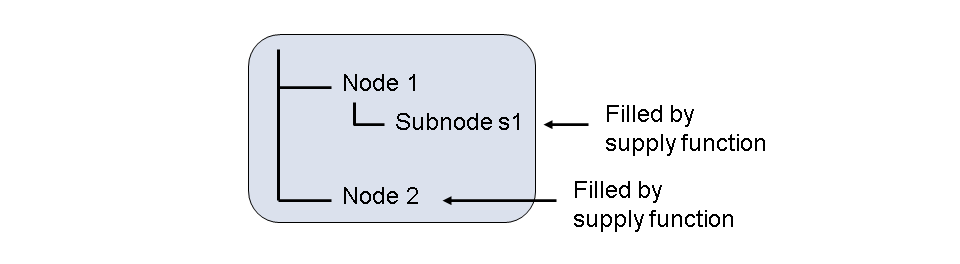
Subnode s1 of node node1 can always be filled by a supply function if the required data only depends on the value of an element of the node node1. In this case, there is an implicit guarantee that this value already exists, because an instance of the node node1 already exists. It can, however, be the case that the data selected for s1 depends on the value of an element of the node node2. However, there may not yet be an instance of the node node2 available when s1 is filled. If the node node2 is also filled by a supply function, it may occur that the supply function of s1 must itself first call the supply function of node node2 . A cascading call of two or more supply functions is invalid and causes a runtime error . Therefore, if you need to access the data of a superordinate node other than the direct superordinate node to fill a context node, do not use the supply function; instead, program the required data retrieval function in an appropriate event handler method. If this is really not possible, at least ensure that any runtime errors are caught and handled correctly.
If you want to trigger the call of a supply function explicitly before the content of the node is used for the first time, you can use the method get_element ().
A supply function always recognizes the parameters PARENT_ELEMENT and NODE automatically. The parameter PARENT_ELEMENT is a reference to the element of the superordinate node (in the example above, an element of the node node1), whose value must be read to retrieve the data; the parameter NODE, however, is a reference to the node that is filled by the supply function ( s1 in our example). You must use these two parameters. It is much more difficult to use a generic method involving generic context methods. There are no real benefits and it is also more prone to errors.
Make sure that you never modify the CONTEXT_NODE_INFO of a context node within a supply function. A supply function must also never modify the value set of a node. This causes complications since the order of the steps performed at runtime may no longer match the values.
Context Change Log
Use the Context Change Log functions to detect user input. This has particular performance benefits while a user of the application modifies only a small amount of data in a view while displaying a large amount of mixed data.
Properties of Context Attributes
Each context attribute has four predefined properties readOnly , visible , state and enabled . The values of these properties can be set with the interface IF_WD_CONTEXT_ATTR. Web Dynpro Framework allows UI element properties with the same name to be bound to the respective attribute property, which means the number of the nodes can be significantly reduced in the context. This improves performance and reduces memory requirement.
More Information : Properties of Context Attributes
Using Object References
We strongly recommend not to keep any references to context nodes and elements because these could become invalid in the interim. Instead, only retrieve the references when you actually need them. If you really need to keep a reference for longer, apply method IS_ALIVE to the reference and check the result before you continue working.