TreeByNestingTableColumn
The TreeByNestingTableColumn element allows the integration of a tree structure in a Table . The tree structure has nodes with subordinate leaves, similar to the UI element Tree . It is displayed in exactly the same way as a TreeByKeyTableColumn element, but is implemented using the recursive context node.
Note that the properties isLeaf, expanded, parentKey, and rowKey must be bound to the attributes of dataSource. The binding to subnodes of dataSource is not permitted here because this would affect performance.
The Selection Keys (table selection menu) for hierarchical tables (TreeByKeyTableColumn, TreeByNestingTableColumn) is not provided.
Unlike the Tree the UI elements for the hierarchical table enable:
- User entries
- Scrolling
- Search with selection of the next hit using the toolbar
Get and Set Selection
- Get all selected elements (including the lead selection)
selected_elements =
CL_WD_DYNAMIC_TOOL=>GET_TABLE_TREE_SELECTION(
DATA_SOURCE = context_node_of_the_data_source
).
- Get the lead selection only
lead_selection =
CL_WD_DYNAMIC_TOOL=>GET_TABLE_TREE_LEAD_SELECTION(
DATA_SOURCE = context_node_of_the_data_source
).
- Set lead selection
With including_single_selection=true all single selections and multi-selections are removed and one single selection is set to the element of the lead selection.
CL_WD_DYNAMIC_TOOL=>SET_TABLE_TREE_LEAD_SELECTION(
LEAD_SELECTION = new_lead_selection_element
DATA_SOURCE = context_node_of_the_data_source
).
- Set all selections
CL_WD_DYNAMIC_TOOL=>SET_TABLE_TREE_LEAD_SELECTION(
DATA_SOURCE = context_node_of_the_data_source
).
Example of the Visual Display
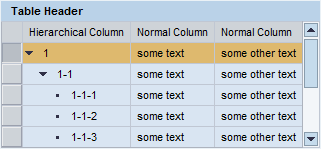
Difference Between TreeByKeyTableColumn and TreeByNestingTableColumn
The difference between these two UI elements is in the data model: For TreeByKeyTableColumn, all data is stored in a context node and the hierarchy is formed from the relationship of the key and parentKey attributes. For TreeByNestingTableColumn, the hierarchy is expressed by the context.
If you already have these key and parentKey attributes, the dataset is not too large, and you want to place all data in the Tree at once, we recommend that you use TreeByKeyTableColumn; otherwise, use TreeByNestingTableColumn.
| Runtime Class |
CL_WD_TREE_BY_NST_TABLE_COL |
Properties in the View Designer
| Name | Type | Initial Value | Bindable |
|---|---|---|---|
|
STRING |
(automatic) |
No |
|
|
Translatable text |
Yes |
||
|
WDUI_TABLE_CELL_DESIGN |
standard |
Yes |
|
|
WDY_BOOLEAN |
false |
Yes |
|
|
WDUI_CONTEXT_MENU_BEHAVIOUR |
inherit |
No |
|
|
WDY_MD_UI_ELEMENT_REFERENCE |
No |
||
|
WDY_BOOLEAN |
false |
Mandatory |
|
|
WDY_BOOLEAN |
false |
Yes |
|
|
WDY_BOOLEAN |
false |
Yes |
|
|
WDY_BOOLEAN |
true |
Yes |
|
|
WDUI_TABLE_HIER_SYMBOL_DESIGN |
standard |
No |
|
|
WDUI_VISIBILITY |
visible |
Yes |
|
|
STRING |
Yes |
Aggregations in the View Designer
| Name | Cardinality | Type |
|---|---|---|
|
0..1 |
||
|
1..1 |
TableCellEditor |
Events in the View Designer
| Name |
|---|
Other properties that can be inherited are defined in the associated higher-level classes. The associated UI elements are:
For dynamic programming, the same properties, events, and aggregations as in the View Designer are available. Bear in mind the different spellings.
Dynamic Programming of Properties
| View Designer Name | Runtime Name | Type |
|---|---|---|
|
ACCESSIBILITY_DESCR |
WDY_MD_TRANSLATABLE_TEXT |
|
|
CELL_DESIGN |
WDUI_TABLE_CELL_DESIGN |
|
|
cellDesign: badvalue_dark |
CL_WD_TREE_BY_NST_TABLE_COL=>E_CELL_DESIGN-BADVALUE_DARK |
|
|
cellDesign: badvalue_light |
CL_WD_TREE_BY_NST_TABLE_COL=>E_CELL_DESIGN-BADVALUE_LIGHT |
|
|
cellDesign: badvalue_medium |
CL_WD_TREE_BY_NST_TABLE_COL=>E_CELL_DESIGN-BADVALUE_MEDIUM |
|
|
cellDesign: calendarAqua |
CL_WD_TREE_BY_NST_TABLE_COL=>E_CELL_DESIGN-CALENDAR_AQUA |
|
|
cellDesign: calendarBlue |
CL_WD_TREE_BY_NST_TABLE_COL=>E_CELL_DESIGN-CALENDAR_BLUE |
|
|
cellDesign: calendarBrown |
CL_WD_TREE_BY_NST_TABLE_COL=>E_CELL_DESIGN-CALENDAR_BROWN |
|
|
cellDesign: calendarGreen |
CL_WD_TREE_BY_NST_TABLE_COL=>E_CELL_DESIGN-CALENDAR_GREEN |
|
|
cellDesign: calendarMetal |
CL_WD_TREE_BY_NST_TABLE_COL=>E_CELL_DESIGN-CALENDAR_METAL |
|
|
cellDesign: calendarPeach |
CL_WD_TREE_BY_NST_TABLE_COL=>E_CELL_DESIGN-CALENDAR_PEACH |
|
|
cellDesign: calendarPurple |
CL_WD_TREE_BY_NST_TABLE_COL=>E_CELL_DESIGN-CALENDAR_PURPLE |
|
|
cellDesign: calendarRose |
CL_WD_TREE_BY_NST_TABLE_COL=>E_CELL_DESIGN-CALENDAR_ROSE |
|
|
cellDesign: calendarStandard |
CL_WD_TREE_BY_NST_TABLE_COL=>E_CELL_DESIGN-CALENDAR_STANDARD |
|
|
cellDesign: calendarTeal |
CL_WD_TREE_BY_NST_TABLE_COL=>E_CELL_DESIGN-CALENDAR_TEAL |
|
|
cellDesign: calendarYellow |
CL_WD_TREE_BY_NST_TABLE_COL=>E_CELL_DESIGN-CALENDAR_YELLOW |
|
|
cellDesign: criticalvalue_dark |
CL_WD_TREE_BY_NST_TABLE_COL=>E_CELL_DESIGN-CRITICALVALUE_DARK |
|
|
cellDesign: criticalvalue_light |
CL_WD_TREE_BY_NST_TABLE_COL=>E_CELL_DESIGN-CRITICALVALUE_LIGHT |
|
|
cellDesign: criticalvalue_medium |
CL_WD_TREE_BY_NST_TABLE_COL=>E_CELL_DESIGN-CRITICALVALUE_DARK |
|
|
cellDesign: four |
CL_WD_TREE_BY_NST_TABLE_COL=>E_CELL_DESIGN-FOUR |
|
|
cellDesign: goodvalue_dark |
CL_WD_TREE_BY_NST_TABLE_COL=>E_CELL_DESIGN-GOODVALUE_DARK |
|
|
cellDesign: goodvalue_light |
CL_WD_TREE_BY_NST_TABLE_COL=>E_CELL_DESIGN-GOODVALUE_LIGHT |
|
|
cellDesign: goodvalue_medium |
CL_WD_TREE_BY_NST_TABLE_COL=>E_CELL_DESIGN-GOODVALUE_MEDIUM |
|
|
cellDesign: group_level1 |
CL_WD_TREE_BY_NST_TABLE_COL=>E_CELL_DESIGN-GROUP_LEVEL1 |
|
|
cellDesign: group_level2 |
CL_WD_TREE_BY_NST_TABLE_COL=>E_CELL_DESIGN-GROUP_LEVEL2 |
|
|
cellDesign: group_level3 |
CL_WD_TREE_BY_NST_TABLE_COL=>E_CELL_DESIGN-GROUP_LEVEL3 |
|
|
cellDesign: key_medium |
CL_WD_TREE_BY_NST_TABLE_COL=>E_CELL_DESIGN-KEY_MEDIUM |
|
|
cellDesign: negative |
CL_WD_TREE_BY_NST_TABLE_COL=>E_CELL_DESIGN-NEGATIVE |
|
|
cellDesign: one |
CL_WD_TREE_BY_NST_TABLE_COL=>E_CELL_DESIGN-ONE |
|
|
cellDesign: positive |
CL_WD_TREE_BY_NST_TABLE_COL=>E_CELL_DESIGN-POSITIVE |
|
|
cellDesign: standard |
CL_WD_TREE_BY_NST_TABLE_COL=>E_CELL_DESIGN-STANDARD |
|
|
cellDesign: three |
CL_WD_TREE_BY_NST_TABLE_COL=>E_CELL_DESIGN-THREE |
|
|
cellDesign: two |
CL_WD_TREE_BY_NST_TABLE_COL=>E_CELL_DESIGN-TWO |
|
|
CHILDREN_LOADED |
WDY_BOOLEAN |
|
|
CONTEXT_MENU_BEHAVIOUR |
WDUI_CONTEXT_MENU_BEHAVIOUR |
|
|
contextMenuBehaviour: inherit |
CL_WD_TREE_BY_NST_TABLE_COL=>E_CONTEXT_MENU_BEHAVIOUR-INHERIT |
|
|
contextMenuBehaviour: provide |
CL_WD_TREE_BY_NST_TABLE_COL=>E_CONTEXT_MENU_BEHAVIOUR-PROVIDE |
|
|
contextMenuBehaviour: suppress |
CL_WD_TREE_BY_NST_TABLE_COL=>E_CONTEXT_MENU_BEHAVIOUR-SUPPRESS |
|
|
CONTEXT_MENU_ID |
WDY_MD_UI_ELEMENT_REFERENCE |
|
|
EXPANDED |
WDY_BOOLEAN |
|
|
HEADER_TEXT_WRAPPING |
WDY_BOOLEAN |
|
|
IS_LEAF |
WDY_BOOLEAN |
|
|
RESIZABLE |
WDY_BOOLEAN |
|
|
SYMBOL_DESIGN |
WDUI_TABLE_HIER_SYMBOL_DESIGN |
|
|
symbolDesign: simple |
CL_WD_TREE_BY_NST_TABLE_COL=>E_SYMBOL_DESIGN-SIMPLE |
|
|
symbolDesign: standard |
CL_WD_TREE_BY_NST_TABLE_COL=>E_SYMBOL_DESIGN-STANDARD |
|
|
VISIBLE |
WDUI_VISIBILITY |
|
|
visible: none |
CL_WD_TREE_BY_NST_TABLE_COL=>E_VISIBLE-NONE |
|
|
visible: visible |
CL_WD_TREE_BY_NST_TABLE_COL=>E_VISIBLE-VISIBLE |
|
|
WIDTH |
STRING |
Dynamic Programming of Events
| View Designer Name | Runtime Name |
|---|---|
|
ON_LOAD_CHILDREN |
|
|
ON_TOGGLE |
Dynamic Programming of Aggregations
| View Designer Name | Runtime Name | Cardinality |
|---|---|---|
|
HEADER |
0..1 |
|
|
TABLE_CELL_EDITOR |
1..1 |
You can find an example of this UI element in the system in the component, WDT_TREE_TABLE_BY_NST.