ALV Output Display in a Dialog Box
You are able to display the ALV output in a separate dialog box, the ALV popup. Here you are able to use all functions of the currently applicable ALV tools as usual.
Screen Status
When you display the ALV output in a separate dialog box, the screen status SALV_TABLE_STDPOPUP (function group SALV_METADATA_STATUS) is automatically used. If you want to change this screen status, you have to first copy the original screen display in a backup copy and then make the desired changes.
You are able to make the following settings for the ALV popup:
-
Display ALV output in a dialog box
-
Specify the Size of the Dialog Box
The following is valid for all of these functions:
|
ALV Tool |
Display type |
Function available |
|
Simple, Two-Dimensional Table |
Classic ABAP List |
Yes |
|
Fullscreen |
Yes |
|
|
In the Container |
No |
|
|
Hierarchical-sequential list |
Classic ABAP List |
Yes |
|
Tree structure |
Fullscreen |
No |
|
In the Container |
No |
Display ALV output in a dialog box
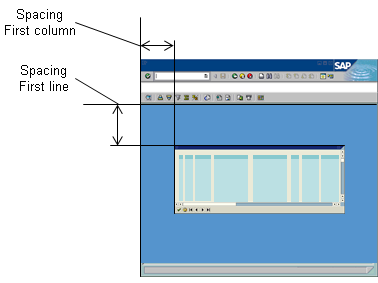
You display the ALV output in the dialog box by specifying the position of the dialog box on the screen. This is measured in columns and rows of characters: Each character corresponds to the width of a column and the height of a row.
You specify the distance between the dialog box and the left side of the screen in columns and from the top of the work area in rows.
Methods
|
Function |
Class |
Method |
|
Display ALV output in a dialog box |
CL_SALV_TABLE CL_SALV_HIERSEQ_TABLE |
SET_SCREEN_POPUP (Parameter START_COLUMN or START_LINE) |
|
Get position of the dialog box |
GET_SCREEN_POPUP |
Specify the Size of the Dialog Box
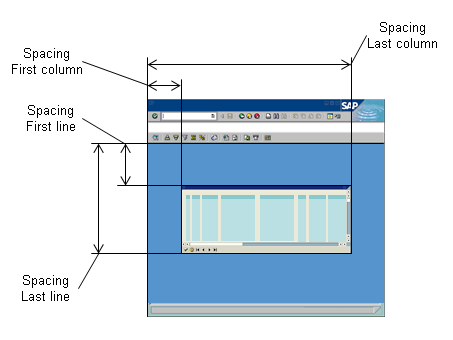
You specify the size of the dialog box only indirectly:
-
The width of the dialog box is determined from the distance between the right side of the dialog box and the edge of the screen
-
The height of the dialog box is determined from the distance between the bottom of the dialog box and the upper edge of the work area.
Methods
|
Function |
Class |
Method |
|
Specify the Size of the Dialog Box |
CL_SALV_TABLE CL_SALV_HIERSEQ_TABLE |
SET_SCREEN_POPUP (Parameter END_COLUMN or END_LINE) |
|
Specify the size of the dialog box |
GET_SCREEN_POPUP |