Filtering Data Rows
Using filters, you restrict the display of data records in the ALV output. To do this, you specify conditions that a record in a specific column has to fulfill in order to be displayed or filtered out.
Like the sort object, you are able to generate a maximum of one filter object for each column. Every filter object can include on or more filter conditions.
Classes
The total of all the filter objects is represented by an object of type CL_SALV_FILTERS. The filter settings for a column are represented by an object of type CL_SALV_FILTER. The individual filter conditions in a filter object are represented by objects of type CL_SALV_SELOPT.
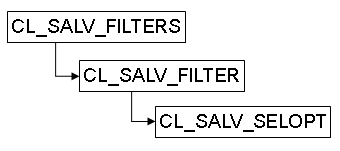
Filter Condition
In a filter condition, you provide information on which data records are to be displayed:
-
The column that contains the checked contents
-
The comparison value with which the rows are tested. This can be an individual value or a range for the given value.
-
The condition, that is, an operator that defines the necessary relation between the cell value and the comparison value (for example, greater than, less than or equal to)
-
Exclusion or inclusion, that is, whether the rows that fit the condition are to be displayed or whether they are not to be displayed
All entries that have the valueAA in the CARRID column should be displayed.
... gr_filter->add_filter( columnname = 'CARRID' sign = 'I' option = 'EQ' low = 'AA' ). ...-
With the columname parameter, you determine the column name
-
With the low (or high) parameter, you determine the comparison value
-
With the option parameter, you determine the condition
-
With the sign parameter, you determine whether it is an inclusive or exclusive condition
-
You can make the following settings for filter objects:
-
Get Filter Objects and Filter Conditions
-
Generate and Delete a Filter Object and Filter Condition
-
Disallowing Filters for a Column
The following is valid for all of these functions:
|
ALV Tool |
Display type |
Function available |
|
Simple, Two-Dimensional Table |
Classic ABAP List |
Yes |
|
Fullscreen |
Yes |
|
|
In the Container |
Yes |
|
|
Hierarchical-sequential list |
Classic ABAP List |
Yes |
|
Tree structure |
Fullscreen |
No |
|
In the Container |
No |
Get Filter Objects and Filter Conditions
The GET_FILTERS method exists in each ALV main class in which filtering is possible. It returns the FILTERS object of the ALV output (all filter objects for the column). Using this FILTERS object with the methods GET or GET_FILTER, you get the filter object for the desired column, as long as one exists there. You also get the filter conditions using the filter object.
|
Function |
Class |
Method |
|
Get FILTERS object |
CL_SALV_TABLE CL_SALV_HIERSEQ_TABLE |
GET_FILTERS |
|
Get all filter objects |
CL_SALV_FILTERS |
GET |
|
Get all filter objects for a hierarchy level |
CL_SALV_HIERSEQ_LEVEL |
GET_FILTERS |
|
Get specific filter object |
CL_SALV_FILTERS |
GET_FILTER |
|
Check whether a column is filtered (a filter object exists) |
IS_FILTER_DEFINED |
|
|
Get all filter conditions for a filter object |
CL_SALV_FILTER |
GET |
Generate and Delete a Filter Object and Filter Condition
You are able to create a maximum of one filter object for a column However, you are able to create any number of filter conditions for each filter object.
You are able to delete filter objects either individually or all at once. The filter conditions for a filter object can only be deleted all at once.
You are only able to generate a filter object for columns in which you have not expressly forbid this (see the Forbidding Filters for a Column section).
Defining Filter Conditions
When you define the first filter object for a column a filter condition is automatically generated. You make the settings for this using the parameters for the method ADD_FILTER. You create all further filter conditions for the same column using the ADD_SELOPT method.
You manage all information for the filter conditions using the methods of class CL_SALV_SELOPT.
|
Function |
Class |
Method |
|
Generate filter object |
CL_SALV_FILTERS |
ADD_FILTER |
|
Delete individual filter object |
REMOVE_FILTER |
|
|
Delete all filter objects |
CLEAR |
|
|
Create filter conditions |
CL_SALV_FILTER |
ADD_SELOPT |
|
Delete all filter conditions |
CLEAR |
|
|
Determine comparison value or area |
CL_SALV_SELOPT |
SET_LOW SET_HIGH |
|
Get comparison value |
GET_LOW GET_HIGH |
|
|
Define condition (operator) |
SET_OPTION |
|
|
Get condition (operator) |
GET_OPTION |
|
|
Determine inclusion or exclusion |
SET_SIGN |
|
|
Get inclusion or exclusion |
GET_SIGN |
If you assign a new data table with a new structure to your ALV output, all filter objects will be deleted automatically.
Disallowing Filters for a Column
By default you or the user is able to define a filter for every column. For each column you can determine whether a filter object can be defined for it.
|
Function |
Class |
Method |
|
Disallowing Filters for a Column |
CL_SALV_FILTERS |
SET_FILTER_ALLOWED |
|
Check whether filters are forbidden for a column |
IS_FILTER_ALLOWED |