Page Window
Starting with Release 4.0, the definition of page windows is required for the alphanumeric Form Painter only. If you use the graphical Form Painter, you can use the mouse to place the windows on the page (drag & drop, cut & paste). It is then no longer necessary to define page windows. For more information on the graphical Form Painter, see BC - Style and Form Maintenance (menu option Further Topics).
If you use the alphanumeric Form Painter, proceed as follows:
When defining windows and pages, you do not yet determine the position and spacing of the texts to be output. To do this, you combine a window and a form page to create a so-called page window. A page window is the definition of a rectangular output area on the output medium (for example, DIN A4 paper page), determined by the left upper edge and the hight and width of the area.
When defining a page window, you determine:
-
which windows appear on a certain page,
-
what size the windows have (width, height),
-
their position (distance between the left upper window edge and the left and upper page margins).
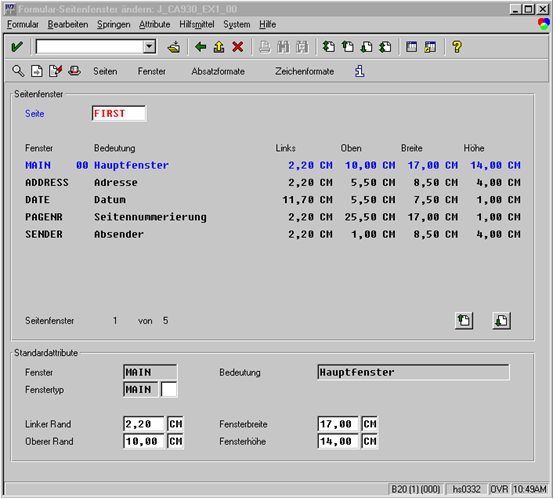
In this example, the user positions the individual windows (previously defined by a user) on the page FIRST by specifying the corresponding coordinates. The user can choose between different measurement units the system offers (LN = Lines, CH = Character, and so on).