Storing Text Components
As mentioned before, a SAPscript text consists of a text header and the text lines. If, according to the storage mode, the corresponding text object is stored in a text file, these two text components are stored in separate tables.
To avoid inconsistencies, use only the corresponding SAPscript function modules to read texts from or write them to text files.
The system stores only those texts in the text file, that have the values 'D' (direct) or 'V' (update task) specified as storage mode.
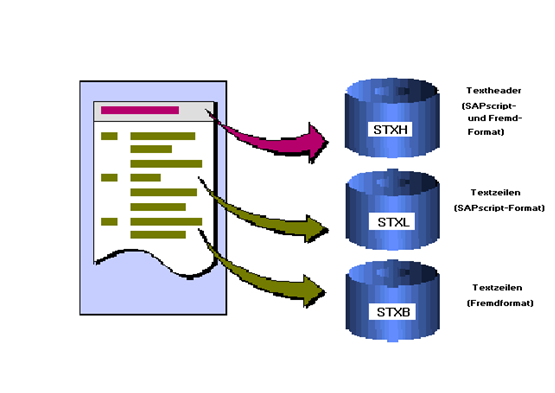
STXH: Store text header
STXH: Store text headerThe text header is stored in the transparent table STXH. This table contains both the text headers of SAPscript texts and of texts with other formats. When reading the table, the system copies this information into the corresponding fields of structure THEAD, which is the basic structure of the internal work area of the text header.
STXL: Store text lines in ITF format
STXL: Store text lines in ITF formatTable STXL stores the text lines of a text in ITF format. This is a non-transparent table, which can be accessed using IMPORT FROM DATABASE / EXPORT TO DATABASE. The text lines are stored in compressed form.
STXB: Store text lines in other formats
STXB: Store text lines in other formatsIf in field TDTEXTTYPE of the text header a text format appears, the text module has a non-SAPscript format. The lines of such texts are stored in table STXB. This table can also store non-representable characters (HEX codes < SPACE). STXB is a non-transparent table, which can be accessed using IMPORT FROM DATABASE / EXPORT TO DATABASE. The text lines are stored in compressed form.