BusinessGraphics
The BusinessGraphics UI element provides a range of chart types, such as bar charts and pie charts, which you can use to display data and the relationships between data graphically. More complex chart types such as "portfolio" or "gantt" charts are also available. The users of your Web application can use these to help with strategic planning decisions or, more generally, as an information chart.
You can use the Chart Designer to modify the UI element properties and other properties (chart elements) of a business graphic, and adapt them to your requirements.
For more information, see:
UI Element BusinessGraphics (chartType gantt)
Accessing Further Methods in a Business Graphics Element
Editing with the Chart Designer
Chart OCX Business Graphic
When using a business graphic, make sure that you use this UI element together with a label UI element, to ensure you meet the accessibility requirements of the application.
To enable the development of accessible applications, the tooltip property is checked during the syntax check.
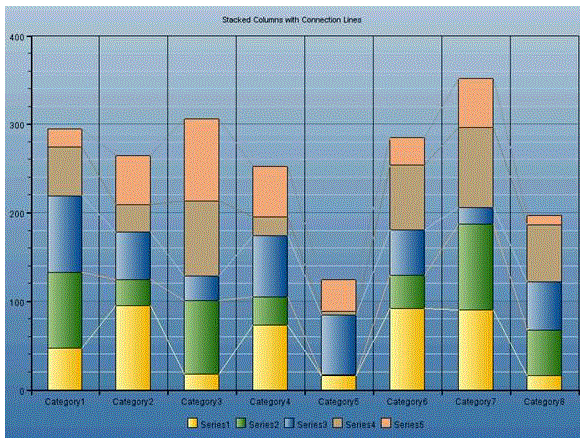
Example of the Visual Display
| Runtime Class |
CL_WD_BUSINESS_GRAPHICS |
Properties in View Designer
| Name | Type | Initial Value | Bindable |
|---|---|---|---|
|
STRING |
(automatic) |
No |
|
|
STRING |
No |
||
|
Context Node |
Yes |
||
|
WDUI_BGTYPE |
columns |
No |
|
|
WDUI_CONTEXT_MENU_BEHAVIOUR |
inherit |
No |
|
|
WDY_MD_UI_ELEMENT_REFERENCE |
No |
||
|
STRING |
No |
||
|
WDUI_BGDIMENSION |
two |
No |
|
|
WDY_BOOLEAN |
true |
Yes |
|
|
STRING |
No |
||
|
I |
300 |
No |
|
|
STRING |
No |
||
|
XSTRING |
Yes |
||
|
Context Node |
Mandatory |
||
|
Translatable text |
Yes |
||
|
STRING |
No |
||
|
WDUI_VISIBILITY |
visible |
Yes |
|
|
I |
300 |
No |
Aggregations in the View Designer
| Name | Cardinality | Type |
|---|---|---|
|
0..1 |
||
|
1..n |
Events in View Designer
| Name |
|---|
Other properties that can be inherited are defined in the related higher-level classes. The related UI elements are:
For dynamic programming, the same properties, events, and aggregations as in the View Designer are available. But note that the spelling format and use of upper/lower case is different.
Dynamic Programming of Properties
| View Designer Name | Runtime Name | Type |
|---|---|---|
|
BACKGROUND_COLOR |
STRING |
|
|
CATEGORY_SOURCE |
OBJECT |
|
|
CHART_TYPE |
WDUI_BGTYPE |
|
|
chartType: area |
CL_WD_BUSINESS_GRAPHICS=>E_CHART_TYPE-AREA |
|
|
chartType: bars |
CL_WD_BUSINESS_GRAPHICS=>E_CHART_TYPE-BARS |
|
|
chartType: columns |
CL_WD_BUSINESS_GRAPHICS=>E_CHART_TYPE-COLUMNS |
|
|
chartType: delta_chart |
CL_WD_BUSINESS_GRAPHICS=>E_CHART_TYPE-DELTA_CHART |
|
|
chartType: doughnut |
CL_WD_BUSINESS_GRAPHICS=>E_CHART_TYPE-DOUGHNUT |
|
|
chartType: gantt |
CL_WD_BUSINESS_GRAPHICS=>E_CHART_TYPE-GANTT |
|
|
chartType: histogram |
CL_WD_BUSINESS_GRAPHICS=>E_CHART_TYPE-HISTOGRAM |
|
|
chartType: lines |
CL_WD_BUSINESS_GRAPHICS=>E_CHART_TYPE-LINES |
|
|
chartType: mta |
CL_WD_BUSINESS_GRAPHICS=>E_CHART_TYPE-MTA |
|
|
chartType: pie |
CL_WD_BUSINESS_GRAPHICS=>E_CHART_TYPE-PIE |
|
|
chartType: pipeline |
CL_WD_BUSINESS_GRAPHICS=>E_CHART_TYPE-PIPELINE |
|
|
chartType: polar |
CL_WD_BUSINESS_GRAPHICS=>E_CHART_TYPE-POLAR |
|
|
chartType: portfolio |
CL_WD_BUSINESS_GRAPHICS=>E_CHART_TYPE-PORTFOLIO |
|
|
chartType: profiles |
CL_WD_BUSINESS_GRAPHICS=>E_CHART_TYPE-PROFILES |
|
|
chartType: profile_area |
CL_WD_BUSINESS_GRAPHICS=>E_CHART_TYPE-PROFILE_AREA |
|
|
chartType: radar |
CL_WD_BUSINESS_GRAPHICS=>E_CHART_TYPE-RADAR |
|
|
chartType: scatter |
CL_WD_BUSINESS_GRAPHICS=>E_CHART_TYPE-SCATTER |
|
|
chartType: smart_map |
CL_WD_BUSINESS_GRAPHICS=>E_CHART_TYPE-SMART_MAP |
|
|
chartType: speedometer |
CL_WD_BUSINESS_GRAPHICS=>E_CHART_TYPE-SPEEDOMETER |
|
|
chartType: split_pie |
CL_WD_BUSINESS_GRAPHICS=>E_CHART_TYPE-SPLIT_PIE |
|
|
chartType: stacked_area |
CL_WD_BUSINESS_GRAPHICS=>E_CHART_TYPE-STACKED_AREA |
|
|
chartType: stacked_bars |
CL_WD_BUSINESS_GRAPHICS=>E_CHART_TYPE-STACKED_BARS |
|
|
chartType: stacked_columns |
CL_WD_BUSINESS_GRAPHICS=>E_CHART_TYPE-STACKED_COLUMNS |
|
|
chartType: stacked_lines |
CL_WD_BUSINESS_GRAPHICS=>E_CHART_TYPE-STACKED_LINES |
|
|
chartType: stacked_profiles |
CL_WD_BUSINESS_GRAPHICS=>E_CHART_TYPE-STACKED_PROFILES |
|
|
chartType: stacked_profile_area |
CL_WD_BUSINESS_GRAPHICS=>E_CHART_TYPE-STACKED_PROFILE_AREA |
|
|
chartType: stacked_radar |
CL_WD_BUSINESS_GRAPHICS=>E_CHART_TYPE-STACKED_RADAR |
|
|
chartType: stacked_time_bars |
CL_WD_BUSINESS_GRAPHICS=>E_CHART_TYPE-STACKED_TIME_BARS |
|
|
chartType: stacked_time_columns |
CL_WD_BUSINESS_GRAPHICS=>E_CHART_TYPE-STACKED_TIME_COLUMNS |
|
|
chartType: time_bars |
CL_WD_BUSINESS_GRAPHICS=>E_CHART_TYPE-TIME_BARS |
|
|
chartType: time_columns |
CL_WD_BUSINESS_GRAPHICS=>E_CHART_TYPE-TIME_COLUMNS |
|
|
chartType: time_scatter |
CL_WD_BUSINESS_GRAPHICS=>E_CHART_TYPE-TIME_SCATTER |
|
|
CONTEXT_MENU_BEHAVIOUR |
WDUI_CONTEXT_MENU_BEHAVIOUR |
|
|
contextMenuBehaviour: inherit |
CL_WD_BUSINESS_GRAPHICS=>E_CONTEXT_MENU_BEHAVIOUR-INHERIT |
|
|
contextMenuBehaviour: provide |
CL_WD_BUSINESS_GRAPHICS=>E_CONTEXT_MENU_BEHAVIOUR-PROVIDE |
|
|
contextMenuBehaviour: suppress |
CL_WD_BUSINESS_GRAPHICS=>E_CONTEXT_MENU_BEHAVIOUR-SUPPRESS |
|
|
CONTEXT_MENU_ID |
WDY_MD_UI_ELEMENT_REFERENCE |
|
|
CUSTOMIZING |
STRING |
|
|
DIMENSION |
WDUI_BGDIMENSION |
|
|
dimension: pseudo_three |
CL_WD_BUSINESS_GRAPHICS=>E_DIMENSION-PSEUDO_THREE |
|
|
dimension: three |
CL_WD_BUSINESS_GRAPHICS=>E_DIMENSION-THREE |
|
|
dimension: two |
CL_WD_BUSINESS_GRAPHICS=>E_DIMENSION-TWO |
|
|
ENABLED |
WDY_BOOLEAN |
|
|
FONT_FAMILY |
STRING |
|
|
HEIGHT |
I |
|
|
IGS_URL |
STRING |
|
|
IMAGE_DATA |
XSTRING |
|
|
SERIES_SOURCE |
OBJECT |
|
|
TOOLTIP |
WDY_MD_TRANSLATABLE_TEXT |
|
|
TRANSPARENT_COLOR |
STRING |
|
|
VISIBLE |
WDUI_VISIBILITY |
|
|
visible: none |
CL_WD_BUSINESS_GRAPHICS=>E_VISIBLE-NONE |
|
|
visible: visible |
CL_WD_BUSINESS_GRAPHICS=>E_VISIBLE-VISIBLE |
|
|
WIDTH |
I |
Dynamic Programming of Events
| View Designer Name | Runtime Name |
|---|---|
|
ON_ACTION |
Dynamic Programming of Aggregations
You can find examples of this interface element in the system in the Web Dynpro application WDR_TEST_UI_ELEMENTS, and in the component WDR_TEST_EVENTS in the views BG_*.