Action Event Handlers
If an action of a UI element is triggered on the user interface of a Web Dynpro application, the event handler of the view controller linked to this action is automatically called. In the event handler, the application developer adds the source code for the steps that will trigger the action. Examples of these steps:
- Reading, editing, and resetting context elements
- Calling function modules
- Triggering navigation
Programming
From a technical point of view, an event handler differs from other controller methods only in that it also responds to the event assigned to the event handler. To program all controller methods, you can choose from several special classes with attributes and methods used to execute the processing steps specific to Web Dynpro. The following example describes in detail a possible structure of a controller method for the handling of an action. For further information on frequently used interfaces and their methods and attributes, refer to chapter Programming of Controller Methods. For a complete list of interfaces, see the reference section of this documentation.
Example: Display of a Simple List of Flights
The user of a Web Dynpro application enters a value in the input field of a view (in this case the abbreviation of an airline). The user selects a button. The following table will be displayed with the data input by the user.
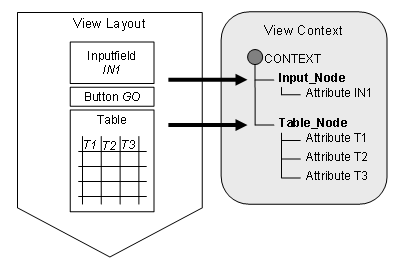
The graphic above shows the design scheme of the view layout and the relevant context. When you call the application for the first time, the table is empty. Once the user enters the value and chooses the GO button, the corresponding action GO is automatically triggered and the event handler method ONACTIONGO is called. The following steps must be performed in this method:
- The attribute of the context node INPUT_NODE is read and passed to an internal variable of the method ONACTIONGO.
- An internal table is filled according to the value of the internal variable.
- The context node is filled with the content of the internal table.
How do these steps translate into source code in the method ONACTIONGO?
Data Declaration
method ONACTIONGO.

data:
INPUT_NODE type ref to IF_WD_CONTEXT_NODE,
      TABLE_NODE type ref to IF_WD_CONTEXT_NODE,

CAR        type        STRING,
      FLIGHTS    type standard table of SPFLI.
First, all of the required internal variables are declared:
- INPUT_NODE is declared as an internal variable for the context node of the user input
- TABLE_NODE is declared as an internal variable for the context node of the result table
- CAR is declared as an internal variable of the user input
- FLIGHTS is declared as an internal table for the result representation
In this example, the tableFLIGHTS refers to the Dictionary table SPFLI and therefore does not need be declared in more detail.
Importing the User Input
The internal variable INPUT_NODE is bound to the context node INPUT_NODE:
INPUT_NODE = WD_CONTEXT->GET_CHILD_NODE( 'INPUT_NODE' ).
To do this, you use attributeWD_CONTEXT and methodGET_CHILD_NODE of interface IF_WD_CONTEXT_NODE, which are available in the Web Dynpro framework.
AttributeWD_CONTEXT always displays a reference to the local controller context: Method ONACTIONGO is a method of the current view controller; soWD_CONTEXT in this case is a reference to the context of the current view (see chapter Reference Variable WD_CONTEXT).
The methodGET_CHILD_NODE returns the reference to the context node INPUT_NODE.
The methodGET_ATTRIBUTE of the same interface subsequently reads the context attribute:
INPUT_NODE->GET_ATTRIBUTE( exporting Name = 'IN1'
                             importing Value = CAR ).
This method retrieves the value of the attribute IN1 from the context node INPUT_NODE and passes it to the internal variableCAR.
This means that the value of the UI element Inputfield is passed to the method ONACTIONGO using the view context and can now be edited.
Filling the Result Table
The internal tableFLIGHTS is filled using a formatted class which, in this example, is calledCL_WD_FLIGHT_MODEL and contains the methodGET_FLIGHTS_BY_CARRID. VariableCAR is passed to this method.
FLIGHTS = CL_WD_FLIGHT_MODEL=>GET_FLIGHTS_BY_CARRID( CAR ).
In this step, no elements specific to Web Dynpro are used.
Passing the Result Table
Once the internal tableFLIGHTS is calculated, it must be linked to the context node TABLE_NODE. As for the reading of the input field, two steps are required:
TABLE_NODE = WD_CONTEXT->GET_CHILD_NODE( 'TABLE_NODE' ).
First, the context nodeTABLE_NODE of the view context is assigned to the internal variable TABLE_NODE. The required attribute or method has already been used for the linking of the node INPUT_NODE. Finally, the content of the internal tableFLIGHTS is passed to the internal variableTABLE_NODE.
TABLE_NODE->BIND_ELEMENTS( FLIGHTS ).

endmethod.
Methodbind_elements is also a method of interface IF_WD_CONTEXT_NODE. It creates new elements from the internal tableFLIGHTS and adds them to the internal variableTABLE_NODE. The attributes for the context node TABLE_NODE are now filled with the values of the internal table and the UI element Table can display the values in the view layout.