MultiPane
The MultiPane UI element is used to order the contents in the form of a grid, similar to the MatrixLayout, but with the difference that the dataSource is bound against a context node.
Complex UI elements such as Table, Tree, GAC*, ViewContiner, InteractiveForm, Gantt, Network, Group, and Tray are not supported. The Table UI element should be used for single-line tabular data.
Example of the Visual Display
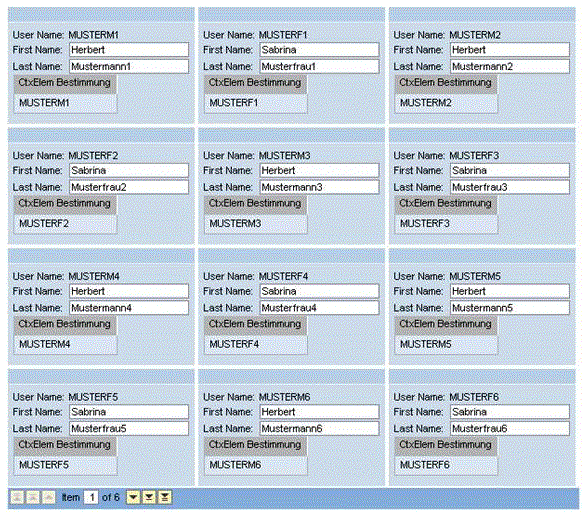
To enable the development of accessible applications, the properties accessbilityDescription and tooltip are checked during the syntax check.
| Runtime Class |
CL_WD_MULTI_PANE |
Properties in View Designer
| Name | Type | Initial Value | Bindable |
|---|---|---|---|
|
STRING |
(automatic) |
No |
|
|
Translatable text |
Yes |
||
|
I |
1 |
Yes |
|
|
WDUI_CONTEXT_MENU_BEHAVIOUR |
inherit |
No |
|
|
WDY_MD_UI_ELEMENT_REFERENCE |
No |
||
|
Context Node |
Mandatory |
||
|
STRING |
Yes |
||
|
WDY_BOOLEAN |
true |
Yes |
|
|
I |
0 |
Yes |
|
|
I |
0 |
Yes |
|
|
WDY_BOOLEAN |
false |
Yes |
|
|
STRING |
Yes |
||
|
I |
-1 |
Yes |
|
|
I |
-1 |
Yes |
|
|
WDY_BOOLEAN |
true |
No |
|
|
WDY_BOOLEAN |
true |
No |
|
|
Translatable text |
Yes |
||
|
WDUI_VISIBILITY |
visible |
Yes |
|
|
STRING |
Yes |
Aggregations in the View Designer
Events in View Designer
| Name |
|---|
Other properties that can be inherited are defined in the related higher-level classes. The related UI elements are:
For dynamic programming, the same properties, events, and aggregations as in the View Designer are available. But note that the spelling format and use of upper/lower case is different.
Dynamic Programming of Properties
| View Designer Name | Runtime Name | Type |
|---|---|---|
|
ACCESSIBILITY_DESCR |
WDY_MD_TRANSLATABLE_TEXT |
|
|
COL_COUNT |
I |
|
|
CONTEXT_MENU_BEHAVIOUR |
WDUI_CONTEXT_MENU_BEHAVIOUR |
|
|
contextMenuBehaviour: inherit |
CL_WD_MULTI_PANE=>E_CONTEXT_MENU_BEHAVIOUR-INHERIT |
|
|
contextMenuBehaviour: provide |
CL_WD_MULTI_PANE=>E_CONTEXT_MENU_BEHAVIOUR-PROVIDE |
|
|
contextMenuBehaviour: suppress |
CL_WD_MULTI_PANE=>E_CONTEXT_MENU_BEHAVIOUR-SUPPRESS |
|
|
CONTEXT_MENU_ID |
WDY_MD_UI_ELEMENT_REFERENCE |
|
|
DATA_SOURCE |
OBJECT |
|
|
EMPTY_TEXT |
STRING |
|
|
ENABLED |
WDY_BOOLEAN |
|
|
FIRST_ACTUAL_PANE |
I |
|
|
FIRST_VISIBLE_PANE |
I |
|
|
FOOTER_VISIBLE |
WDY_BOOLEAN |
|
|
HEIGHT |
STRING |
|
|
PANE_COUNT |
I |
|
|
ROW_COUNT |
I |
|
|
STRETCHED_HORIZONTALLY |
WDY_BOOLEAN |
|
|
STRETCHED_VERTICALLY |
WDY_BOOLEAN |
|
|
TOOLTIP |
WDY_MD_TRANSLATABLE_TEXT |
|
|
VISIBLE |
WDUI_VISIBILITY |
|
|
visible: none |
CL_WD_MULTI_PANE=>E_VISIBLE-NONE |
|
|
visible: visible |
CL_WD_MULTI_PANE=>E_VISIBLE-VISIBLE |
|
|
WIDTH |
STRING |
Dynamic Programming of Events
| View Designer Name | Runtime Name |
|---|---|
|
ON_SCROLL |
Dynamic Programming of Aggregations
| View Designer Name | Runtime Name | Cardinality |
|---|---|---|
|
CONTENT |
0..1 |
You can find examples of this interface element in the system in the Web Dynpro application WDR_TEST_UI_ELEMENTS, and in the component WDR_TEST_EVENTS in the MULTI_PANE view.