FormattedTextEdit
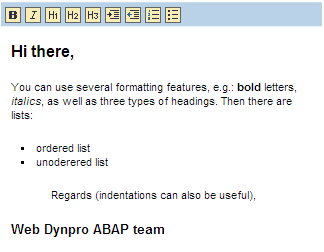
FormattedTextEdit is used to edit formatted text. For the most part FormattedTextEdit corresponds to FormattedTextView .
Possible formats are:
- Headers 1 to 3
- Alphabetical and non-alphabetical lists
- Indentations
- Text printed in bold and italics
All formatting options contained in the toolbar can be used. The formatting options correspond to the XHTML conventions Note that <U> in XHTML is deprecated and is therefore not included.
Images, links, underscores, and colors are not possible.
Example of the Visual Display
|
Runtime Class |
CL_WD_FORMATTED_TEXT_EDIT |
Properties in the View Designer
|
Name |
Type |
Initial Value |
Bindable |
|
STRING |
(automatic) |
No |
|
|
WDUI_CONTEXT_MENU_BEHAVIOUR |
inherit |
No |
|
|
STRING |
No |
||
|
WDY_BOOLEAN |
true |
Yes |
|
|
STRING |
Yes |
||
|
WDUI_IMEMODE |
auto |
Yes |
|
|
WDY_BOOLEAN |
false |
Yes |
|
|
WDUI_TEXT_DIRECTION |
inherit |
Yes |
|
|
Translatable text |
Yes |
||
|
Translatable text |
Mandatory |
||
|
WDUI_VISIBILITY |
visible |
Yes |
|
|
STRING |
Yes |
Other properties that can be inherited are defined in the associated higher-level classes. The associated UI elements are:
For dynamic programming, the same properties, events, and aggregations as in the View Designer are available. Bear in mind the different spellings.
Dynamic Programming of Properties
|
View Designer Name |
Runtime Name |
Type |
|
CONTEXT_MENU_BEHAVIOUR |
WDUI_CONTEXT_MENU_BEHAVIOUR |
|
|
contextMenuBehaviour: inherit |
CL_WD_FORMATTED_TEXT_EDIT=>E_CONTEXT_MENU_BEHAVIOUR-INHERIT |
|
|
contextMenuBehaviour: provide |
CL_WD_FORMATTED_TEXT_EDIT=>E_CONTEXT_MENU_BEHAVIOUR-PROVIDE |
|
|
contextMenuBehaviour: suppress |
CL_WD_FORMATTED_TEXT_EDIT=>E_CONTEXT_MENU_BEHAVIOUR-SUPPRESS |
|
|
CONTEXT_MENU_ID |
STRING |
|
|
ENABLED |
WDY_BOOLEAN |
|
|
HEIGHT |
STRING |
|
|
IME_MODE |
WDUI_IMEMODE |
|
|
imeMode: active |
CL_WD_FORMATTED_TEXT_EDIT=>E_IME_MODE-ACTIVE |
|
|
imeMode: auto |
CL_WD_FORMATTED_TEXT_EDIT=>E_IME_MODE-AUTO |
|
|
imeMode: disabled |
CL_WD_FORMATTED_TEXT_EDIT=>E_IME_MODE-DISABLED |
|
|
imeMode: inactive |
CL_WD_FORMATTED_TEXT_EDIT=>E_IME_MODE-INACTIVE |
|
|
READ_ONLY |
WDY_BOOLEAN |
|
|
TEXT_DIRECTION |
WDUI_TEXT_DIRECTION |
|
|
textDirection inherit |
CL_WD_FORMATTED_TEXT_EDIT=>E_TEXT_DIRECTION-INHERIT |
|
|
textDirection ltr |
CL_WD_FORMATTED_TEXT_EDIT=>E_TEXT_DIRECTION-LTR |
|
|
textDirection rtl |
CL_WD_FORMATTED_TEXT_EDIT=>E_TEXT_DIRECTION-RTL |
|
|
TOOLTIP |
WDY_MD_TRANSLATABLE_TEXT |
|
|
VALUE |
WDY_MD_TRANSLATABLE_TEXT |
|
|
VISIBLE |
WDUI_VISIBILITY |
|
|
visible: none |
CL_WD_FORMATTED_TEXT_EDIT=>E_VISIBLE-NONE |
|
|
visible: visible |
CL_WD_FORMATTED_TEXT_EDIT=>E_VISIBLE-VISIBLE |
|
|
WIDTH |
STRING |
You can find examples in the system in the Web Dynpro application demo_uiel_formatted_text_edit. You can switch between the FormattedTextView and the FormattedTextEdit using a button.